 By Hamza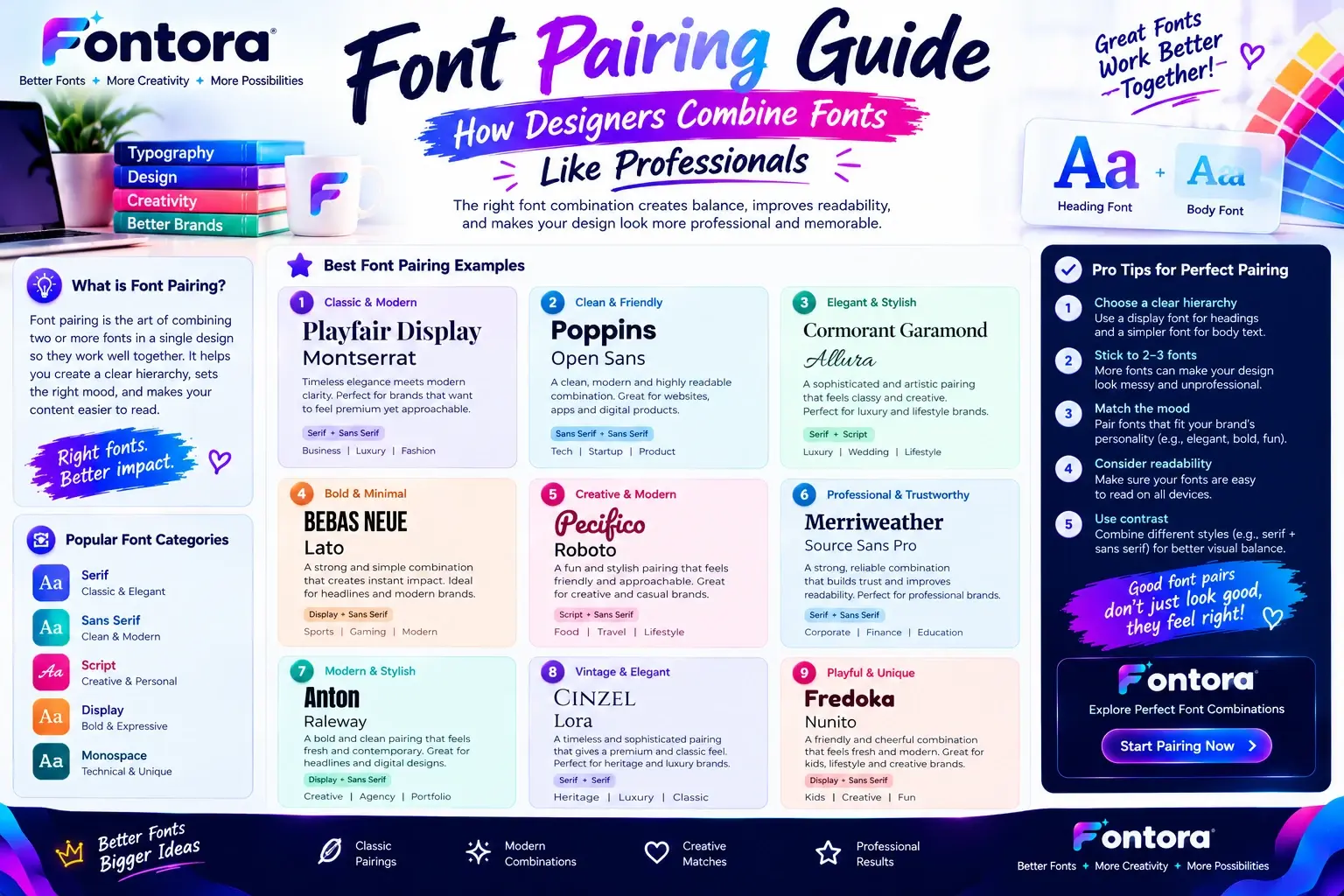
Introduction Choosing the right fonts can completely change how people understand and interact with a design. Font pairing is the process of combining different typefaces that complement each other to create harmony, readability, and visual impact. Professional designers do not simply choose fonts…
Introduction
Choosing the right fonts can completely change how people understand and interact with a design. Font pairing is the process of combining different typefaces that complement each other to create harmony, readability, and visual impact. Professional designers do not simply choose fonts that look attractive individually; they carefully combine styles, weights, spacing, and personalities to create a consistent design experience.
Whether you are designing a website, logo, social media post, presentation, or brand identity, the right font combination helps guide attention and communicate your message effectively. In this guide, we will explain how designers choose fonts, the principles behind successful font combinations, common mistakes to avoid, and practical examples you can use in your own projects.
What Is Font Pairing?
Font pairing is the process of combining two or more fonts that work together to create a balanced, readable, and visually attractive design. Professional designers use font pairing to build typography systems that improve user experience, strengthen brand identity, and communicate the right emotions.
A font is more than just a visual style of letters.
Every typeface carries a personality.
Some fonts communicate:
Trust and authority
Luxury and elegance
Creativity and imagination
Technology and innovation
Energy and excitement
When designers combine fonts correctly, each typeface has a specific purpose.
One font may be responsible for attracting attention.
Another font may improve readability.
Another font may create a memorable brand identity.
This relationship between fonts creates a complete visual experience.
For example, a luxury fashion brand may combine an elegant serif font for headlines with a clean sans-serif font for body text. The serif font creates a premium feeling, while the sans-serif font makes information easier to read.
A technology company may choose modern sans-serif combinations because they communicate simplicity, efficiency, and innovation.
A gaming brand may combine bold display fonts with futuristic typography because gaming audiences expect powerful and energetic designs.
This is why professional font pairing is not about randomly selecting two attractive fonts.
It is about understanding:
The purpose of the design
The target audience
Brand personality
User expectations
Visual hierarchy
Before creating professional font combinations, designers need a strong understanding of typography fundamentals. Typography includes font selection, spacing, hierarchy, readability, and communication. You can learn the complete foundation in Fontora’s What Is Typography? guide.
A strong typography foundation helps designers understand why some font combinations feel natural while others feel confusing.
Why Font Pairing Matters in Modern Design
Typography plays a major role in how people experience digital content.
Before users read the actual words, they first notice the visual appearance of the text.
They immediately process:
Font style
Size
Weight
Spacing
Layout
These elements create an emotional reaction.
A professional font combination can make a website or brand feel:
Reliable
Modern
Premium
Creative
Easy to understand
A poor font combination can make the same design feel:
Unprofessional
Difficult to read
Confusing
Outdated
This is why font pairing is important in almost every design field.
Professional designers use font combinations for:
Websites
Logos
Branding projects
Social media graphics
Advertisements
Mobile applications
Packaging designs
The purpose of typography is not only to make something look beautiful.
The purpose is to communicate effectively.
Font Pairing Creates Strong Visual Hierarchy
One of the biggest reasons designers combine fonts is to create visual hierarchy.
Visual hierarchy helps users understand:
What information is most important
Where they should look first
How content is organized
Imagine visiting a website where every piece of text uses the same font size, weight, and style.
The page would feel flat.
Users would struggle to understand what matters.
Font pairing solves this problem by creating different levels of importance.
For example:
A large bold headline attracts attention.
A supporting font explains additional information.
A readable body font allows comfortable reading.
This creates a natural reading flow.
Professional designers usually create typography systems with different roles.
Primary Font
The primary font is the main attention element.
It is commonly used for:
Headlines
Hero sections
Brand statements
Important messages
Its job is to create personality.
Secondary Font
The secondary font supports the primary font.
It is used for:
Subheadings
Navigation
Supporting information
Its job is to create balance.
Body Font
The body font focuses on readability.
It is used for:
Articles
Product descriptions
Educational content
Long paragraphs
Its job is to make information comfortable to consume.
This structure is used by professional designers because it creates consistency across different platforms.
The Relationship Between Font Pairing and Typography
Many beginners think typography only means selecting fonts.
However, typography is a complete design system.
It includes:
Font selection
Font pairing
Spacing
Alignment
Hierarchy
Readability
Visual rhythm
Font pairing is one important part of typography.
A designer who understands typography can make better font decisions because they understand how different elements influence user experience.
For example:
A beautiful font with poor spacing may still look unprofessional.
A creative font with weak readability may frustrate users.
A strong typography system balances creativity with usability.
If you want to understand how fonts, typefaces, and visual communication work together, Fontora’s Typography Guide provides a complete beginner-friendly explanation.
Understanding Font Styles Before Creating Font Pairings
Before choosing fonts, designers need to understand different font categories.
Every font style creates a different impression.
Choosing fonts without understanding their characteristics can lead to weak combinations.
For example:
A luxury brand and a gaming community may both need attractive typography, but their font choices should be completely different because their audiences and goals are different.
Font styles help designers understand:
Personality
Emotional impact
Appropriate usage
Design limitations
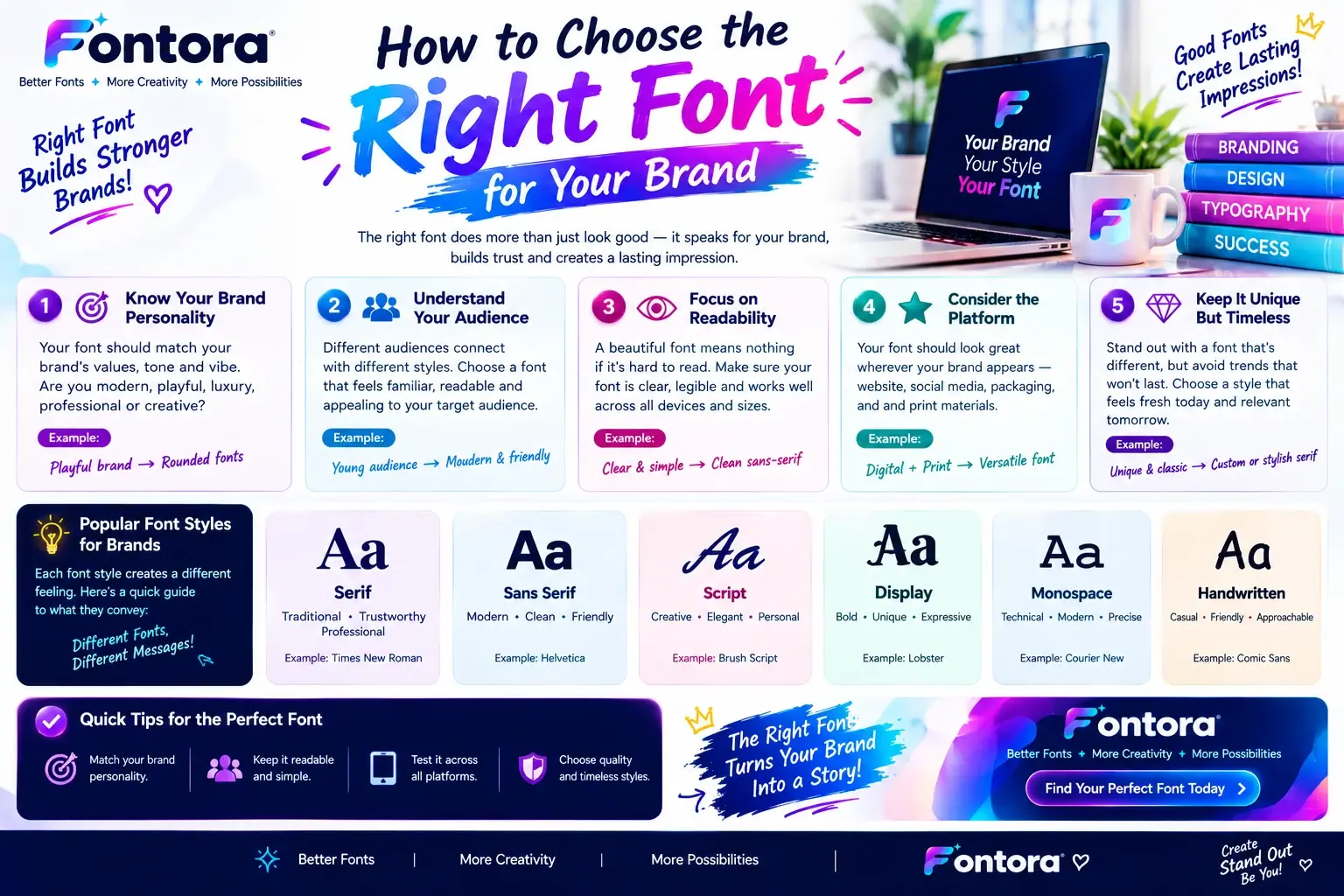
Fontora’s Font Styles Guide explains different typography categories, including serif, sans-serif, script, gothic, bubble, and decorative fonts.
Serif Fonts: Traditional, Elegant, and Trustworthy
Serif fonts contain small decorative strokes at the end of letters.
They are one of the oldest typography styles and are commonly associated with:
Tradition
Experience
Authority
Luxury
Professionalism
Serif fonts are frequently used in:
Newspapers
Books
Editorial websites
Universities
Premium brands
A company using serif typography often wants to communicate trust and credibility.
For example:
A luxury watch company may use serif typography because it creates a feeling of heritage and craftsmanship.
A financial company may use serif fonts because customers often associate them with stability.
However, serif fonts are not always ideal for every situation.
On digital platforms, designers often combine serif fonts with cleaner fonts to improve readability.
Sans Serif Fonts: Modern, Simple, and Digital-Friendly
Sans-serif fonts do not contain decorative strokes.
They have cleaner shapes and are widely used in modern digital design.
They communicate:
Simplicity
Innovation
Efficiency
Modernity
They are commonly used by:
Technology companies
Startups
Mobile applications
SaaS platforms
Digital products
Their clean structure makes them highly readable on screens.
This is why many modern websites use sans-serif typography systems.
A technology company may choose a modern sans-serif font because it creates a feeling of innovation and accessibility.
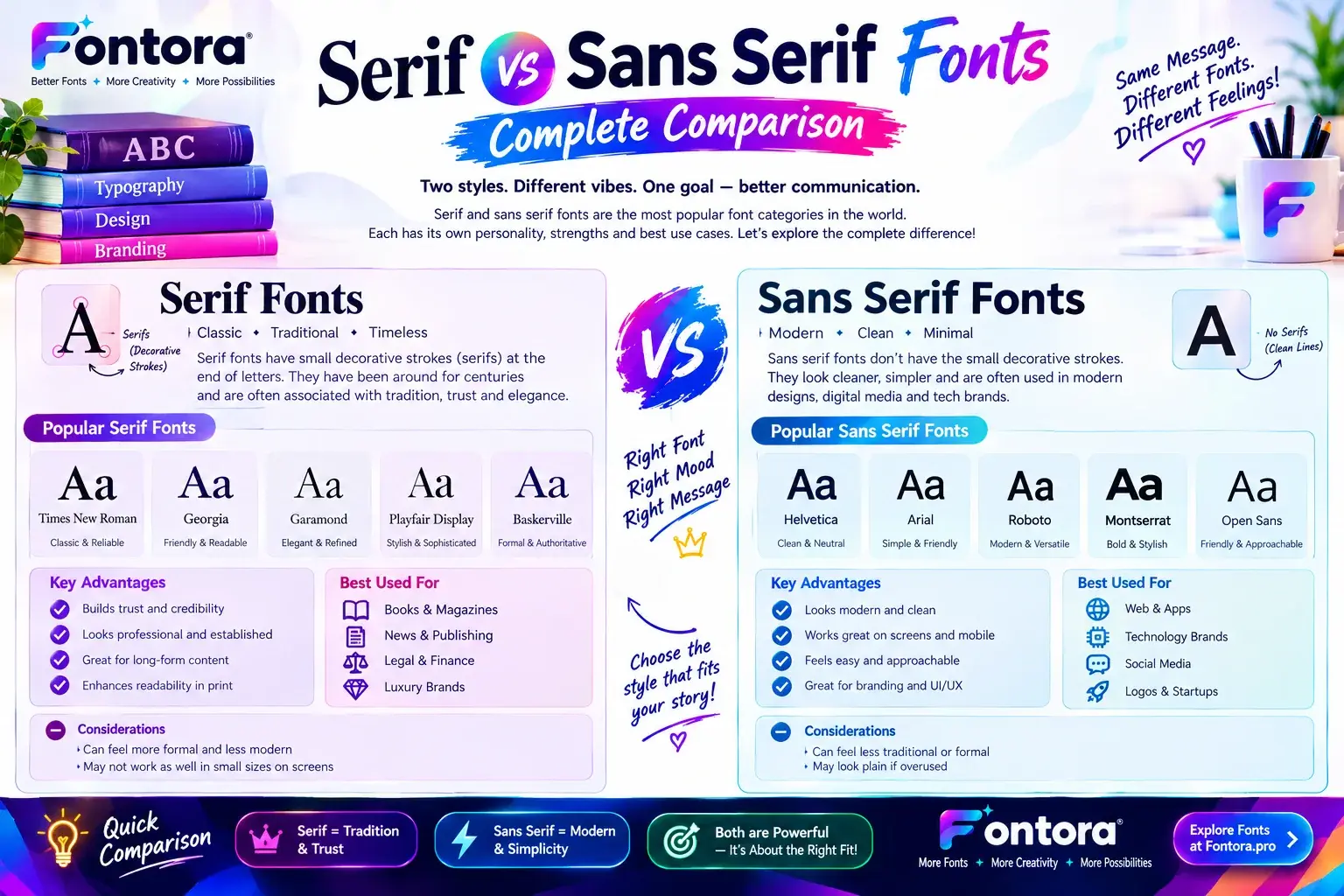
Serif vs Sans Serif Font Pairing Strategy
Combining serif and sans-serif fonts is one of the most popular professional typography approaches.
The reason is simple:
They create natural contrast.
Serif fonts provide:
Personality
Elegance
Authority
Sans-serif fonts provide:
Simplicity
Clarity
Modern appearance
Together, they create balance.
Common combinations include:
Serif headline + Sans-serif body
Used for:
Blogs
Editorial websites
Luxury brands
Sans-serif headline + Serif supporting text
Used for:
Professional websites
Corporate designs
Creative projects
Understanding when to use each category helps designers create stronger typography systems.
For a deeper comparison, explore Fontora’s Serif vs Sans Serif Fonts guide.
Script Fonts: Adding Creativity and Personality
Script fonts imitate handwriting and calligraphy.
They create feelings of:
Creativity
Elegance
Personal connection
Artistic expression
They are commonly used in:
Wedding designs
Fashion brands
Beauty businesses
Personal branding
However, script fonts should be used carefully.
They work best for:
Logos
Short headlines
Special messages
They are usually not suitable for:
Long articles
Product descriptions
Large paragraphs
A common professional combination is:
Script font + clean sans-serif font
This creates emotional impact while keeping information readable.
For designers interested in exploring this style further, Fontora’s Cursive Fonts Guide explains how cursive typography works and where it is most effective.
Gothic Fonts: Creating Strong, Dramatic, and Memorable Typography
Gothic fonts are known for their bold appearance, historical influence, and powerful visual identity. They often create feelings of mystery, strength, tradition, and uniqueness.
Unlike simple modern fonts, gothic typography has a strong personality.
It is commonly used in:
Gaming designs
Music branding
Horror themes
Streetwear brands
Vintage projects
Creative logos
Gothic fonts can create an unforgettable impression when they are paired correctly.
However, because gothic fonts are visually powerful, designers usually combine them with simpler fonts to maintain readability.
For example:
A gothic headline can create a dramatic first impression.
A clean sans-serif paragraph can make the supporting information easy to understand.
This creates a balance between personality and usability.
If you want to explore the history, characteristics, and creative applications of this style, check Fontora’s Gothic Fonts Guide.
Bubble Fonts: Fun and Playful Font Pairings
Bubble fonts are designed with rounded shapes and soft edges.
They create a friendly and playful feeling.
They are commonly used for:
Children’s brands
Social media graphics
Creative campaigns
Gaming content
Fun promotional designs
Bubble fonts communicate:
Creativity
Happiness
Friendliness
Youthfulness
Because bubble fonts already have a strong personality, they work best when paired with simple supporting fonts.
For example:
Bubble font headline + clean sans-serif body
This combination creates a fun design without reducing readability.
A common mistake is using multiple playful fonts together.
When every element is competing for attention, the design becomes difficult to understand.
Professional designers create balance by allowing one font to be expressive while another font provides structure.
Glitch Fonts: Digital and Futuristic Typography
Glitch fonts represent digital distortion, technology, and futuristic design.
They are inspired by:
Computer errors
Digital effects
Cyberpunk aesthetics
Gaming culture
They are commonly used in:
Gaming graphics
Technology projects
Music artwork
Streaming channels
Digital campaigns
Glitch fonts create strong visual impact but should be used carefully.
Because they are highly decorative, they are usually better for:
Short headlines
Logos
Titles
They are not ideal for:
Long paragraphs
Educational articles
Detailed information
A professional combination may include:
Glitch headline + modern sans-serif content font
The glitch style attracts attention, while the supporting font keeps the message clear.
For more examples of digital and gaming typography styles, explore Fontora’s Gaming Fonts Guide.
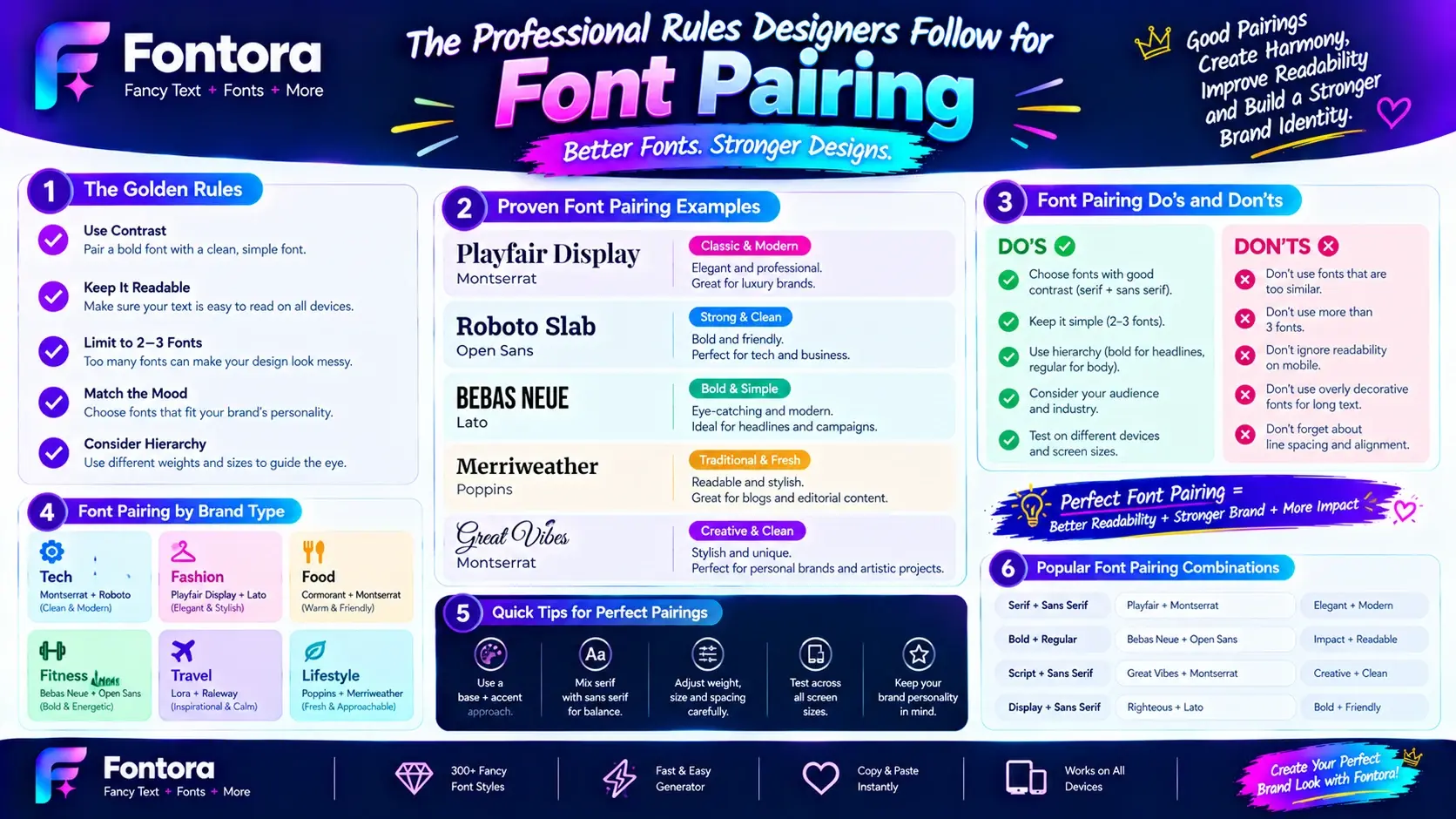
The Professional Rules Designers Follow for Font Pairing
Choosing fonts is only the beginning.
Professional designers follow specific principles to ensure that different fonts work together effectively.
A successful font pairing should create:
Contrast
Balance
Consistency
Readability
Emotional connection
Let’s explore the rules designers use when creating professional typography systems.
Rule 1: Create Contrast Without Creating Conflict
Contrast is one of the most important principles in font pairing.
If two fonts are too similar, the design may feel boring.
If two fonts are completely different, the design may feel chaotic.
The goal is controlled contrast.
For example:
A classic serif headline combined with a modern sans-serif paragraph creates a professional balance.
The serif font provides:
Character
Elegance
Personality
The sans-serif font provides:
Clarity
Simplicity
Easy reading
The fonts are different, but they support each other.
This is the foundation of strong typography.
Rule 2: Give Every Font a Clear Purpose
Professional designers never choose fonts randomly.
Every font should have a role.
A common typography system includes:
Attention Font
Used for:
Headlines
Logos
Important messages
Purpose:
Create impact.
Supporting Font
Used for:
Subheadings
Navigation
Supporting information
Purpose:
Create balance.
Reading Font
Used for:
Articles
Product descriptions
Long-form content
Purpose:
Improve readability.
When every font has a purpose, the design feels organized and intentional.
Rule 3: Match Font Personality With Audience Expectations
A font combination should always match the audience.
Different industries require different emotional messages.
For example:
Luxury Industry
Needs:
Elegance
Premium feeling
Sophistication
Common approach:
Elegant serif + minimal sans-serif
Technology Industry
Needs:
Innovation
Simplicity
Modern feeling
Common approach:
Modern sans-serif combinations
Gaming Industry
Needs:
Energy
Competition
Personality
Common approach:
Bold display fonts + futuristic styles
Creative Industry
Needs:
Originality
Expression
Artistic identity
Common approach:
Display fonts + clean supporting fonts
Understanding audience psychology is one of the biggest differences between beginner and professional typography decisions.
Rule 4: Avoid Using Too Many Fonts
One of the most common mistakes beginners make is using too many fonts.
More fonts do not automatically create a better design.
Too many typefaces create:
Confusion
Weak branding
Poor consistency
Most professional designs use:
One primary font
One supporting font
Sometimes one accent font
A limited typography system usually looks more premium.
For example:
A website may use:
Primary:
Elegant serif
Secondary:
Modern sans-serif
Accent:
Creative script font
This creates variety without damaging consistency.
Rule 5: Balance Font Weight and Size
Font pairing is not only about choosing different font categories.
Designers also create contrast through:
Size
Weight
Spacing
A large bold heading naturally attracts attention.
A smaller regular paragraph supports reading.
Different font weights create hierarchy.
Example:
Headline:
Extra bold
Subheading:
Medium
Body:
Regular
This structure makes content easier to scan.
Rule 6: Always Test Fonts in Real Designs
A font combination may look perfect in a font preview but fail in a real project.
Professional designers test fonts in:
Website layouts
Mobile screens
Social media designs
Advertisements
Brand materials
They check:
Can users read it easily?
Does it represent the brand?
Does it work on different devices?
Testing prevents poor typography decisions.
Font Pairing for Brand Identity
Typography plays a major role in branding.
A brand’s fonts influence how customers remember and perceive the business.
Strong typography helps create:
Recognition
Trust
Consistency
Professional identity
A company should not choose fonts only because they look attractive.
The fonts should represent:
Brand values
Audience
Industry
Market position
For example:
A luxury brand may use elegant typography because customers expect premium experiences.
A technology company may use modern typography because customers associate clean design with innovation.
A creative business may use unique combinations because originality is part of its identity.
A complete branding typography system should work across:
Website
Logo
Packaging
Social media
Marketing materials
To understand how businesses select typography that matches their identity, explore Fontora’s Brand Fonts Guide.
Font Pairing for Social Media Designs
Social media platforms are highly competitive environments.
Users scroll quickly, meaning typography must capture attention immediately.
Successful social media typography usually combines:
An attention-grabbing font.
A readable supporting font.
This approach works well for:
Instagram posts
TikTok videos
YouTube thumbnails
Promotional graphics
Creators often use unique typography styles to develop recognizable content identities.
For example:
A creator may use a bold headline style for videos.
A clean supporting font for captions.
A creative font style for branding elements.
Users who want to experiment with unique text designs can use Fontora’s Fancy Text Generator to create different text styles for social media profiles, gaming names, and digital content.
Font Pairing for Websites: Creating Better Digital Experiences
Website typography is one of the most important parts of user experience. A website can have excellent content and powerful features, but poor typography can make visitors leave quickly.
Professional designers understand that website fonts have two responsibilities:
Communicate the brand personality.
Make information easy to read.
A successful website font pairing creates a balance between creativity and usability.
For websites, designers usually consider:
Screen readability
Mobile experience
Loading performance
Brand identity
Content structure
Unlike posters or logos, websites contain large amounts of information. Therefore, typography choices must support long-term reading.
Font Pairing for Blogs and Content Websites
Blogs require typography that focuses heavily on readability.
Readers spend more time consuming information, so fonts should reduce visual fatigue.
A common professional combination is:
Serif headline + Sans-serif body
Why does this work?
The serif heading creates personality and helps articles feel editorial.
The sans-serif paragraph improves readability on digital screens.
For example:
A blog title may use an elegant serif font.
The article content may use a clean modern font.
This creates a professional publishing experience.
Good blog typography improves:
Reading time
Content engagement
User satisfaction
Overall experience
Font Pairing for Business Websites
Business websites need typography that builds trust.
The font combination should communicate:
Professionalism
Reliability
Expertise
Common approaches include:
Corporate Style
Modern sans-serif heading + readable sans-serif body
Used by:
Consulting companies
Software businesses
Agencies
Premium Business Style
Elegant serif heading + clean sans-serif body
Used by:
Luxury services
Financial companies
Professional brands
The correct font pairing helps businesses create a stronger first impression.
Font Pairing for E-Commerce Websites
E-commerce websites have a unique goal:
Convert visitors into customers.
Typography influences purchasing decisions because it affects trust and product perception.
Good e-commerce typography should make users feel:
Confident
Comfortable
Interested
A common approach:
Strong headline font + highly readable product font
For example:
Product category headings may use a bold display style.
Product descriptions may use a simple readable font.
Buttons and calls-to-action should always prioritize clarity.
Typography should guide users toward action without creating confusion.
Font Pairing for Mobile Applications
Mobile design requires special attention because screen space is limited.
Fonts must remain readable on smaller devices.
Professional designers consider:
Font size
Letter spacing
Line height
Screen resolution
A common mobile typography system uses:
Modern sans-serif heading
Simple sans-serif body
This creates a clean experience.
Mobile users often scan quickly, so typography should make information easy to understand.
Font Pairing for Gaming Communities
Gaming typography has different requirements compared to traditional websites.
Gaming audiences often prefer designs that feel:
Powerful
Competitive
Unique
Futuristic
Popular gaming combinations include:
Display fonts + futuristic fonts
Gothic fonts + modern fonts
Glitch fonts + digital fonts
However, creativity should not destroy readability.
A gamer username should look unique but remain recognizable.
A gaming website should feel exciting but still allow users to navigate easily.
Fontora’s Gaming Fonts guide explains how gaming creators use different typography styles for usernames, logos, and digital communities.
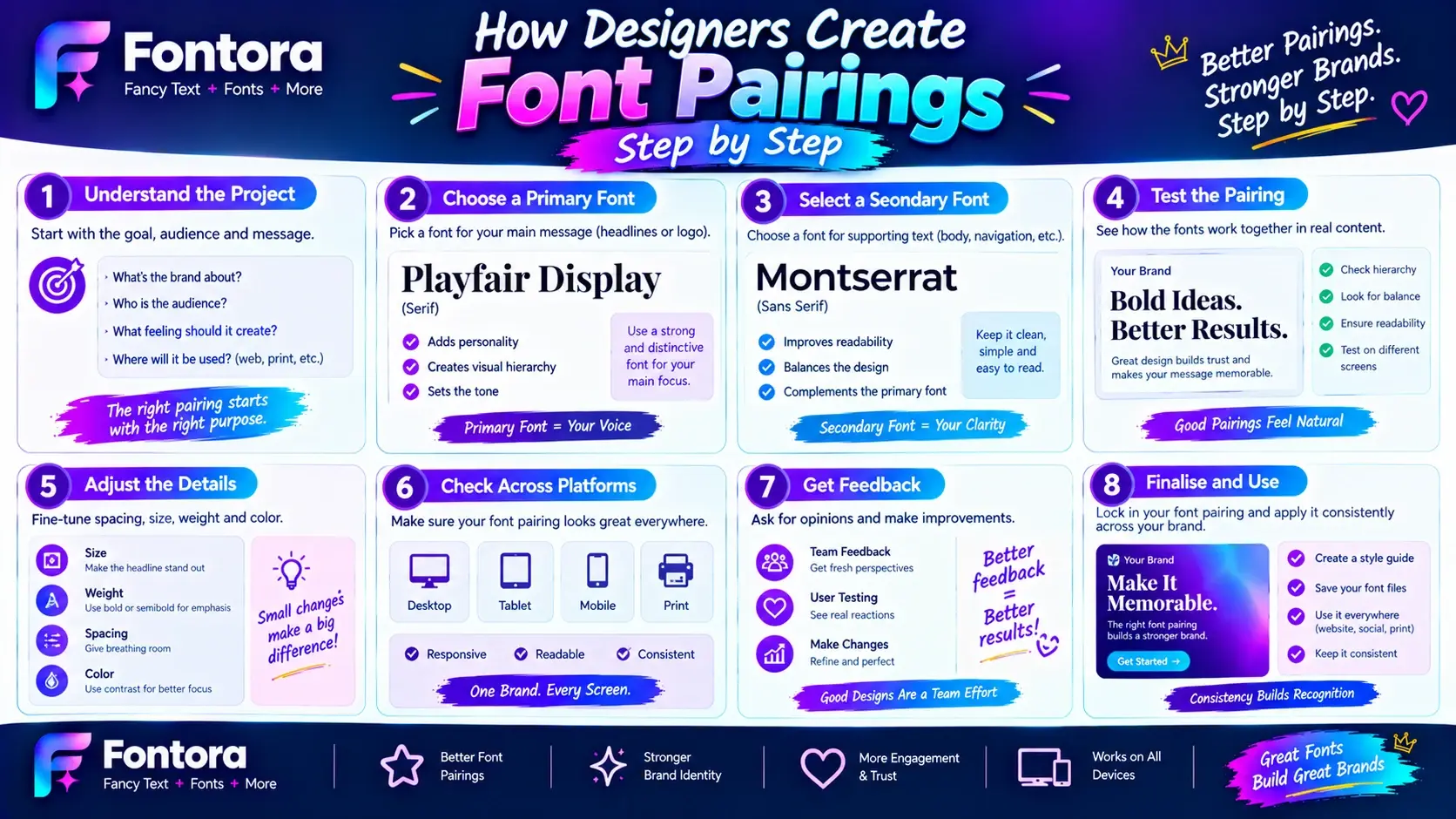
How Designers Create Font Pairings Step by Step
Professional designers usually follow a structured process instead of randomly selecting fonts.
Below is a practical framework beginners can follow.
Step 1: Understand the Purpose of the Design
Before choosing fonts, define the goal.
Ask:
What am I designing?
Who will see it?
What emotion should it create?
For example:
A wedding invitation needs elegance.
A gaming logo needs energy.
A business website needs trust.
A social media post needs attention.
The purpose determines the typography direction.
Step 2: Understand the Audience
Typography should match the people viewing it.
Different audiences respond differently to fonts.
For example:
Young creative audiences may prefer experimental typography.
Professional audiences may prefer clean and trustworthy designs.
Luxury customers may respond better to elegant typography.
Understanding the audience prevents choosing fonts based only on personal taste.
Step 3: Choose the Primary Font
The primary font creates the first impression.
It is usually selected for:
Main headlines
Logos
Important sections
The primary font should represent the personality of the project.
Examples:
Luxury:
Elegant serif
Technology:
Modern sans-serif
Gaming:
Bold display font
Creative:
Unique decorative font
Step 4: Select a Supporting Font
The supporting font should balance the primary font.
The supporting font should not compete.
Instead, it should improve:
Readability
Structure
Professional appearance
Example:
Primary:
Creative display font
Supporting:
Simple sans-serif font
The first font attracts attention.
The second font communicates information.
Step 5: Test Different Combinations
Professional designers test multiple options.
They compare:
Headline appearance
Paragraph readability
Mobile performance
Brand feeling
A font combination that looks good individually may not work together.
Testing reveals the strongest option.
Fontora’s Font Generator helps creators explore different font styles and experiment with typography ideas before finalising a design.
Step 6: Create Typography Consistency
Once the font combination is selected, maintain consistency.
Do not change fonts randomly across different pages.
A strong typography system should work across:
Website pages
Social media
Marketing materials
Brand assets
Consistency improves recognition.
Common Font Pairing Mistakes Beginners Make
Understanding mistakes is just as important as understanding best practices.
Many poor designs fail because of simple typography errors.
Using Too Many Fonts
One of the biggest mistakes is adding too many fonts.
More fonts do not create a more professional design.
They usually create:
Confusion
Visual noise
Weak branding
Most professional designs use:
One main font
One supporting font
One optional accent font
Simple typography systems usually look more premium.
Choosing Fonts Without Considering Readability
A font may look beautiful but still be difficult to read.
This happens frequently with:
Decorative fonts
Script fonts
Highly artistic fonts
Creative fonts should support communication, not block it.
Always test:
Paragraph reading
Mobile display
Different screen sizes
Using Fonts With Similar Personalities
Another common mistake is choosing fonts that are too similar.
For example:
Two decorative fonts together may compete.
Two strong display fonts may create confusion.
Successful pairings usually include contrast.
Example:
Elegant serif + simple sans-serif
Creative display + neutral supporting font
Following Trends Without Strategy
Typography trends change.
A style that is popular today may become outdated later.
Professional designers use trends carefully.
They prioritize:
Brand identity
Audience
Purpose
Longevity
A timeless font combination usually performs better than a temporary trend.
Ignoring Brand Personality
A font should match the message.
A serious financial company should not use playful cartoon typography.
A children’s brand should not use overly formal corporate typography.
The best font choices connect with the audience emotionally.
Font Pairing and AI Search Optimisation
Modern search engines increasingly understand topics through relationships.
A strong typography article should not only explain font pairing.
It should connect related concepts:
Font pairing connects with:
Typography
Font styles
Brand identity
Font psychology
User experience
Design tools
This creates stronger topical authority.
Google and AI search systems understand that professional typography involves multiple connected concepts.
That is why Fontora’s typography content ecosystem connects:
Font styles
Branding
Psychology
Generators
Design resources
A complete knowledge structure helps users and search engines understand expertise.
Typography Tools for Professional Designers
Professional designers use tools to research, test, and improve typography decisions.
Useful resources help with:
Font discovery
Font comparison
Design inspiration
Typography testing
A strong workflow usually includes:
Research
↓
Testing
↓
Comparison
↓
Final selection
Fontora’s Typography Tools collection helps designers and creators discover useful resources for improving their typography workflow.
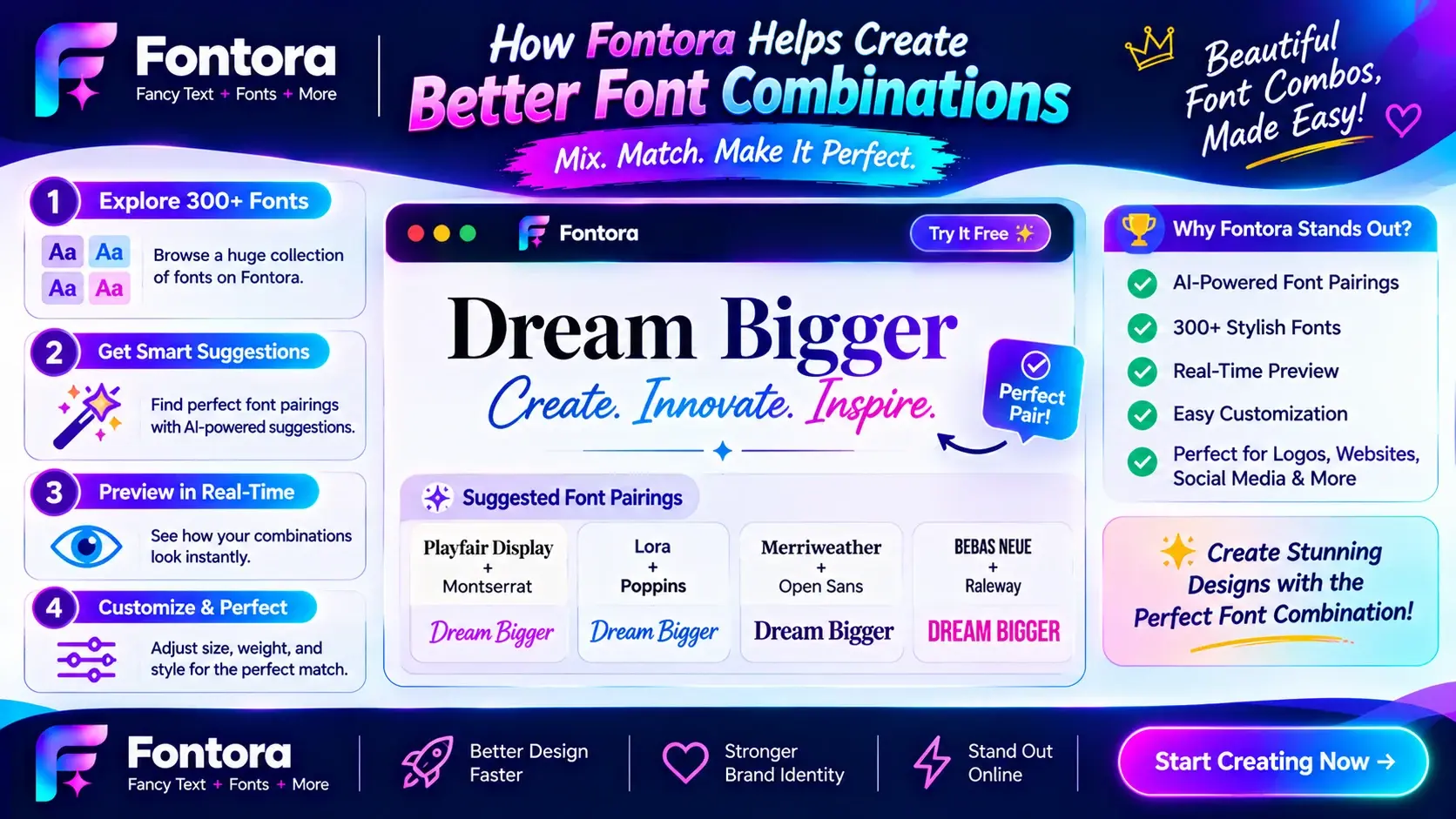
How Fontora Helps Create Better Font Combinations
Choosing fonts manually can take significant time.
Creators often need to test many styles before finding the right combination.
Fontora helps users explore typography possibilities through different tools and resources.
With Fontora, creators can:
Experiment with different text styles
Discover creative typography ideas
Generate unique text designs
Understand typography principles
For social media creators, designers, and marketers, Fontora’s tools make typography experimentation faster and easier.
The goal is not replacing creativity.
The goal is helping creators discover better possibilities.
Expert Font Pairing Checklist for Designers
Creating professional typography combinations becomes easier when designers follow a clear checklist.
Before finalising any font pairing, ask these important questions:
Does the Font Combination Match the Purpose?
The first question should always be:
"What is this design trying to achieve?"
A font combination for a luxury brand should not look the same as a gaming website.
A font combination for an educational blog should not look the same as a fashion advertisement.
The purpose controls the typography decision.
Examples:
Luxury:
Elegant serif fonts
Minimal supporting fonts
Technology:
Clean sans-serif fonts
Modern typography
Gaming:
Bold display fonts
Futuristic styles
Creative projects:
Unique fonts
Expressive typography
Is There Enough Contrast?
Good font pairing requires contrast.
Check:
Are the fonts visually different?
Does one font lead while another supports?
Can users easily identify headings and body content?
A successful combination creates interest without creating confusion.
Are Both Fonts Easy to Read?
Beauty should never replace usability.
Always test:
Headlines
Paragraphs
Buttons
Mobile screens
A font that looks attractive but makes reading difficult can damage the entire design.
Does the Typography Represent the Brand?
Fonts should support brand identity.
Ask:
Does this font feel trustworthy?
Does it communicate the right emotion?
Does it match the target audience?
A professional brand chooses typography strategically.
Does the Combination Work Across Different Platforms?
Modern designs appear everywhere:
Websites
Mobile devices
Social media
Advertisements
Presentations
A font combination should remain effective across all platforms.
A beautiful desktop design that fails on mobile is not successful typography.
Advanced Font Pairing Techniques Used by Professional Designers
Experienced designers use advanced methods to create stronger combinations.
Pair Fonts From Different Categories
One of the safest approaches is combining different font categories.
Examples:
Serif + Sans-serif
Creates:
Professional appearance
Balance
Strong readability
Script + Sans-serif
Creates:
Creativity
Personality
Modern elegance
Display + Simple font
Creates:
Attention
Visual impact
Clear communication
Different categories naturally create contrast.
Pair Fonts With Similar Structural Characteristics
Although contrast is important, fonts should still feel connected.
Professional designers look for similarities such as:
Similar letter shapes
Similar proportions
Similar visual tone
For example:
Two modern sans-serif fonts may work together because they share a similar design language.
The goal is:
Contrast in appearance.
Harmony in feeling.
Use Font Weight to Create Variation
Sometimes designers do not need completely different fonts.
They create contrast using different weights.
Example:
Same font family:
Bold heading
Medium subheading
Regular paragraph
This creates hierarchy while maintaining consistency.
This approach is popular in:
Websites
Apps
SaaS products
Digital platforms
Use Font Spacing Strategically
Typography is not only about the font itself.
Spacing also affects perception.
Professional designers adjust:
Letter spacing
Line height
Paragraph width
Text alignment
For example:
Luxury brands often use more spacing because it creates elegance.
Technology websites often use tighter spacing because it creates efficiency.
Font Pairing Examples for Different Industries
Different industries require different typography approaches.
Fashion and Luxury Brands
Goal:
Create elegance and exclusivity.
Recommended combination:
Elegant serif + Minimal sans-serif
Why it works:
The serif font creates premium perception.
The sans-serif font keeps information modern.
Common uses:
Fashion websites
Beauty brands
Luxury products
Technology Companies
Goal:
Communicate innovation and simplicity.
Recommended combination:
Modern sans-serif + Geometric sans-serif
Why it works:
Clean typography represents:
Technology
Efficiency
Future thinking
Education Websites
Goal:
Create trust and readability.
Recommended combination:
Readable serif + Clean sans-serif
Why it works:
The serif creates authority.
The sans-serif improves digital reading.
Gaming Brands
Goal:
Create excitement and personality.
Recommended combination:
Display font + Futuristic font
Why it works:
Gaming audiences respond well to strong visual identity.
For more gaming typography inspiration, explore Fontora’s Gaming Fonts guide.
Social Media Creators
Goal:
Capture attention quickly.
Recommended combination:
Bold creative font + Simple supporting font
Social media content requires immediate recognition.
Creators often use unique typography styles for:
Instagram bios
TikTok videos
YouTube thumbnails
Gaming profiles
Users looking for creative text styles can explore Fontora’s Fancy Text Generator to create unique typography variations.
Font Pairing vs Using One Font Family
Many designers ask:
"Should I use multiple fonts or one font family?"
The answer depends on the project.
Using One Font Family
Advantages:
Consistency
Simplicity
Professional appearance
Best for:
Corporate websites
Apps
Minimal designs
Using Multiple Font Families
Advantages:
More personality
Stronger contrast
More creative freedom
Best for:
Branding
Editorial design
Creative campaigns
The key is balance.
Multiple fonts should have a purpose.
How Font Generators Help Designers Experiment
Finding the perfect typography combination requires experimentation.
Designers often test:
Different styles
Different weights
Different combinations
A font generator can speed up this creative process by helping designers explore possibilities quickly.
Fontora’s Font Generator allows creators to experiment with different typography styles and discover new design directions.
This is especially useful for:
Designers
Content creators
Marketers
Brand owners
The Future of Font Pairing With AI and Digital Design
Artificial intelligence is changing how designers discover and combine fonts.
Modern tools can help creators:
Suggest combinations
Analyze visual styles
Generate typography ideas
Improve design workflows
However, human creativity remains important.
AI can suggest options.
But designers still need to understand:
Audience
Brand goals
Emotional impact
User experience
The best results come from combining technology with design knowledge.
Conclusion
Font pairing is the art of combining fonts that create balance, readability, and visual impact. The right combination helps brands communicate their personality, improves user experience, and makes designs more professional.
Whether you are creating a website, logo, social media design, or marketing material, always choose fonts based on purpose, audience, and readability.
A strong font pairing is not about using the most attractive fonts — it is about creating harmony between different typefaces.
Frequently Asked Questions About Font Pairing
What is font pairing?
Font pairing is the process of combining two or more fonts that work well together in a design. Designers use font pairing to create visual hierarchy, improve readability, and communicate a brand’s personality effectively.
A good font pairing creates balance between different typefaces by giving each font a specific role, such as headlines, supporting text, logos, or body content.
Why is font pairing important in design?
Font pairing is important because typography affects how users understand and interact with content. The right combination of fonts improves readability, creates professional visual identity, and helps communicate the correct emotions.
A poor font combination can make a design confusing, while a strong pairing makes the design more attractive and easier to understand.
How many fonts should I use in one design?
Most professional designers recommend using two or three fonts in one design.
A common typography system includes:
One primary font for headlines
One secondary font for supporting information
One optional accent font for special elements
Using too many fonts can create visual confusion and weaken brand consistency.
What are the best font combinations for beginners?
Some beginner-friendly font combinations include:
Serif + Sans-serif
Bold Display + Simple Sans-serif
Script + Clean Sans-serif
These combinations work well because they create contrast while maintaining readability.
For example, an elegant serif headline combined with a modern sans-serif paragraph creates a professional and balanced design.
Should headings and body text use different fonts?
Yes, using different fonts for headings and body text is a common professional design practice.
Headings usually need a font that creates attention and personality.
Body text needs a font that focuses on readability.
Combining different fonts creates a clear visual hierarchy that helps users scan and understand information faster.
What is the difference between font pairing and typography?
Typography is the complete system of arranging and presenting text, including font selection, spacing, alignment, hierarchy, and readability.
Font pairing is one part of typography that focuses specifically on combining different fonts effectively.
A strong typography system usually includes thoughtful font pairing.
How do I choose fonts that match my brand?
To choose fonts that match your brand, consider:
Your target audience
Industry
Brand personality
Emotional message
User expectations
For example:
Luxury brands often use elegant serif fonts.
Technology companies often use clean modern fonts.
Creative brands may use unique display or script fonts.
A brand’s typography should represent its values and identity.
Can font pairing improve website user experience?
Yes, font pairing can significantly improve website user experience.
The right font combination helps users:
Read content more comfortably
Understand information faster
Navigate pages easily
Trust the brand more
Good typography improves both visual design and usability.
What fonts work best together: serif or sans-serif?
Serif and sans-serif fonts are one of the most popular font combinations because they create natural contrast.
Serif fonts add:
Elegance
Authority
Tradition
Sans-serif fonts add:
Simplicity
Modernity
Readability
This combination works well for websites, blogs, brands, and digital products.
Learn more about their differences in Fontora’s Serif vs Sans Serif Fonts guide.
Can I use decorative fonts for professional designs?
Yes, decorative fonts can be used professionally when applied correctly.
They work best for:
Logos
Short headlines
Creative campaigns
Special branding elements
However, decorative fonts should not usually be used for long paragraphs because they may reduce readability.
How can I test different font combinations?
You can test font combinations by applying them to real design examples such as:
Website layouts
Social media posts
Logos
Advertisements
Using typography tools and font generators can help you compare different styles quickly.
Fontora’s Font Generator helps designers experiment with different typography options before choosing a final combination.
What role does psychology play in font pairing?
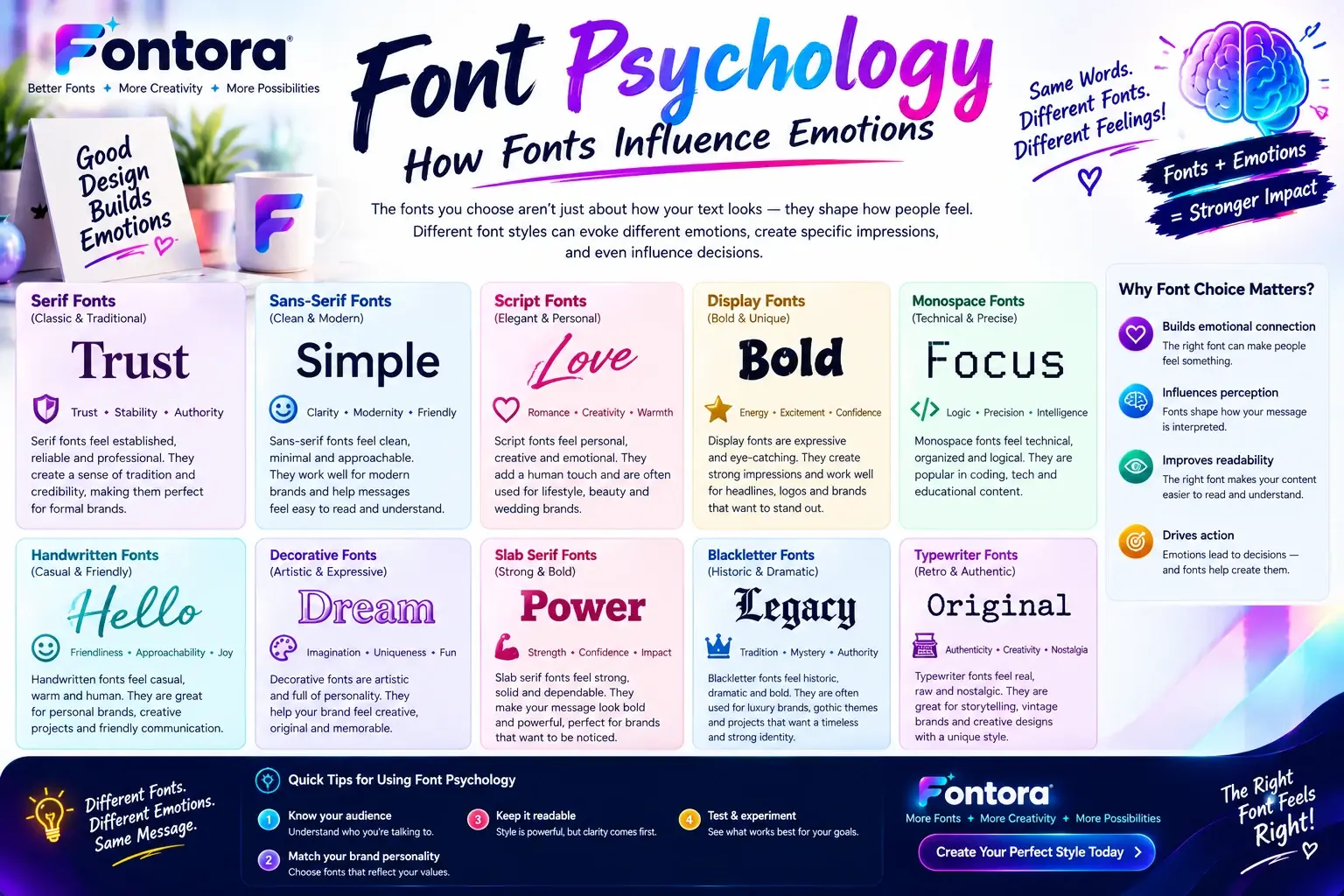
Font psychology explains how different typefaces influence emotions and perceptions.
For example:
Serif fonts can create trust and authority.
Sans-serif fonts can communicate simplicity and innovation.
Script fonts can create creativity and elegance.
Bold display fonts can create excitement and confidence.
Understanding font psychology helps designers choose combinations that match the intended message.
Explore more in Fontora’s Font Psychology guide.
What is the easiest font pairing rule to follow?
The easiest rule is:
Choose one font that creates personality and another font that improves readability.
For example:
Creative headline font + simple body font.
This creates contrast while keeping the design professional.
Can AI tools help with font pairing?
Yes, AI-powered tools can help designers discover font combinations, generate ideas, and speed up the creative process.
However, professional results still require human understanding of:
Brand goals
Audience
Design principles
User experience
AI can provide suggestions, but designers make the final strategic decisions.