 By Hamza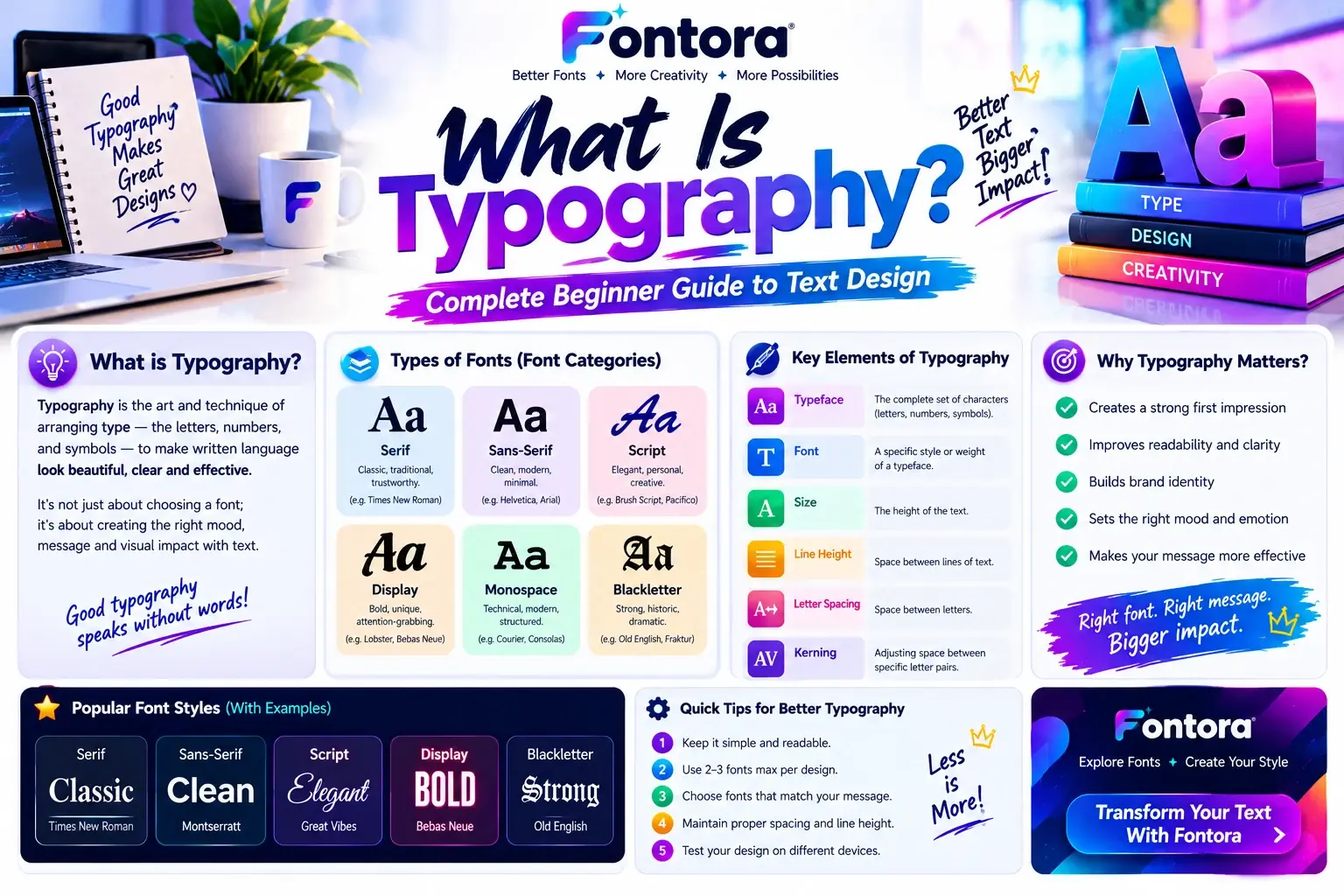
What Is Typography? Typography is the art and technique of arranging text to make written content clear, readable, and visually appealing. It includes selecting fonts, adjusting spacing, creating hierarchy, and organizing text layouts. Designers use typography in websites, branding, apps, books, and digital content to improve communication and user experience.
What Is Typography? Complete Beginner Guide to Text Design
Introduction
Typography is everywhere around us. From website headlines and mobile apps to product packaging and social media posts, the way text looks affects how people understand information. Good typography helps readers focus on important messages while creating a better visual experience.
Many people think typography is only about choosing attractive fonts, but it is much more than that. It combines font selection, spacing, alignment, size, and layout to create organised and meaningful text. Whether you are designing a website, building a brand, or creating digital content, understanding typography helps you communicate more effectively.
In this complete guide, you will learn what typography means, why it matters, different typography styles, real-world examples, and how modern tools can help you create better text designs.
What Is Typography? (Definition, Meaning, and History)
Typography is the art and practice of arranging written text to make information clear, readable, and visually attractive. It focuses on how letters, words, and sentences appear on a page or screen by using font selection, spacing, size, alignment, and layout.
In simple words, typography controls how written content looks, feels, and communicates with readers. Designers use typography to guide attention, improve readability, and create a consistent visual style across websites, brands, advertisements, books, and digital products.
Many beginners think typography is only about choosing a beautiful font, but it is much more than that. A font is only one part of typography. Good typography combines different elements, such as typeface selection, text hierarchy, spacing, and structure, to create a smooth and enjoyable reading experience.
For example, a website headline may use a bold and expressive typeface to capture attention, while the body text may use a simple and clean font style to make long paragraphs easier to read. The combination of these decisions creates effective typography design.
The Meaning of Typography
The word typography comes from two Greek words:
Typos → meaning impression, mark, or shape
Graphia → meaning writing or recording
Together, these words describe the process of creating visual communication through written language.
Typography became widely recognised with the growth of printing technology. Early printers developed different letter designs, spacing systems, and layouts to make books easier to read and visually organised. Over time, typography evolved from printed materials into modern digital experiences.
Today, typography plays an important role in many areas, including:
Website design
Mobile applications
Brand identity
Advertising campaigns
User interface design
Social media content
Digital products
Modern designers use typography not only to display words but also to express emotions, build trust, and create memorable experiences.
Typography, Typeface, and Font: Understanding the Difference
Typography, typefaces, and fonts are closely connected, but they are not the same thing.
Typography is the complete process of arranging and designing text. It includes decisions about font choices, spacing, alignment, and visual hierarchy.
A typeface is a collection of letters and characters that share a similar design style. Examples include Helvetica, Times New Roman, and Futura.
A font is a specific variation of a typeface. For example, Helvetica Bold, Helvetica Regular, and Helvetica Italic are different fonts within the same typeface family.
Understanding the difference between these terms helps designers create better visual communication. Choosing the right font styles can change how a message feels and how users interact with written content. You can explore different typography categories in our guide about different types of font styles.
If you want to understand how text appearance changes through digital characters and creative styles, our guide on what is a fancy text generator explains how modern tools create unique text designs.
Why Is Typography Important in Design?
Typography plays an important role in how people read, understand, and interact with information. Good typography does more than make text look attractive. It creates structure, improves communication, and helps users find the information they need quickly.
Whether it is a website, mobile app, advertisement, or brand identity, typography influences how people feel about a design. A well-planned text layout can make content easier to understand, while poor text choices can make even valuable information difficult to read.
Typography Improves Readability
The main purpose of typography is to make written content comfortable for readers. Proper font selection, spacing, and text arrangement help users move through information without confusion.
For example, a website with clear headings, balanced paragraph spacing, and readable fonts allows visitors to scan content easily. This improves the overall user experience and keeps readers engaged for longer.
Important readability factors include:
Font size
Line spacing
Letter spacing
Text contrast
Paragraph structure
Content hierarchy
A designer must consider where and how the content will be viewed. A font that looks good on a large screen may not provide the same experience on a mobile device.
Typography Creates Visual Hierarchy
Visual hierarchy helps readers understand which information is most important. Typography creates this structure by using different font sizes, weights, styles, and spacing.
For example:
Large headings attract attention first.
Subheadings organise information.
Body text provides detailed explanations.
Bold or highlighted text emphasises important points.
Without proper hierarchy, a page can feel crowded and difficult to navigate. Effective typography guides the reader naturally through the content.
Typography Builds Brand Identity
Typography is a powerful part of branding because fonts can communicate personality and emotions. Different type styles create different impressions.
A luxury brand may choose elegant serif fonts to appear traditional and premium. A technology company may use clean sans-serif fonts to communicate simplicity and innovation.
Businesses carefully select typography because consistent text styles help people recognise and remember a brand. If you want to understand how fonts influence emotions and user perception, you can explore our guide on font psychology.
Typography Improves User Experience
In digital design, typography directly affects how users interact with a website or application. Clear text helps visitors complete actions faster, understand messages, and enjoy smoother navigation.
Good digital typography considers:
Screen size
Loading speed
Accessibility
Reading comfort
Content organisation
This is especially important for websites because users often leave pages that are difficult to read or poorly structured.
Typography Supports Better Communication
Every design has a message. Typography helps deliver that message with the right tone and feeling.
For example:
A playful design may use creative and decorative text styles.
A professional website may use simple and clean fonts.
A news platform may focus on readability and clarity.
The right typography choice makes content more meaningful and helps connect with the target audience.
Typography vs Fonts: What Is The Difference?
Many people use the words typography, fonts, and typefaces as if they mean the same thing. Although these terms are connected, they represent different parts of text design.
Understanding the difference between typography and fonts helps designers create better websites, branding materials, and digital experiences. A font is only one tool used in typography, while typography includes the complete process of arranging and presenting written content.
What Is Typography?
Typography is the complete art of organising text in a visually effective way. It includes decisions about:
Font selection
Text size
Spacing
Alignment
Colors
Layout
Visual hierarchy
A designer uses typography to make information easier to read and create a specific mood or style.
For example, choosing a bold heading, comfortable paragraph spacing, and clear text structure for a website is part of typography design.
What Is a Font?
A font is a specific style of letters used to display text. It controls how individual characters look.
Examples of fonts include:
Arial
Times New Roman
Roboto
Inter
Helvetica
A font can have different variations, such as:
Regular
Bold
Italic
Light
Extra Bold
These variations help designers create different levels of emphasis within a design.
Typeface vs Typography: Understanding the Difference
A typeface is a collection or family of letters that share a similar design style. A font is a specific version inside that typeface family.
For example:
The typeface may be Roboto.
The fonts inside it can include:
Roboto Regular
Roboto Bold
Roboto Italic
Typography uses these fonts and typefaces along with spacing, layout, and hierarchy to create a complete visual experience.
Key Differences Between Typography and Fonts
Typography focuses on the complete arrangement and presentation of text.
Fonts focus only on the appearance of letters.
Typography answers questions like:
Where should the heading appear?
How much space should be between lines?
Which text should get more attention?
How should different text elements work together?
Fonts answer questions like:
What style should the letters have?
Should the text look modern, classic, playful, or professional?
When Should You Focus on Typography?
Typography becomes important when you need to create a complete design experience.
You should focus on typography when creating:
Websites
Brand identities
Mobile applications
Marketing materials
Social media designs
Digital products
Good typography ensures that every text element works together properly.
When Should You Focus on Fonts?
Fonts are important when selecting the visual style of your content.
You may focus on fonts when you need to:
Choose a brand style
Create a logo
Design a poster
Improve the appearance of text
Match a specific design theme
Choosing the right font is the first step, but combining it with proper spacing and layout creates effective typography.
Why This Difference Matters
Understanding typography and fonts helps designers avoid common mistakes. A beautiful font alone cannot create a successful design. The way text is arranged, balanced, and presented determines the final result.
For example, two websites can use the same font but feel completely different because of differences in spacing, colours, layout, and hierarchy.
If you want to explore how different text styles are created digitally, you can also learn more about a font generator and how modern tools help designers experiment with different text appearances.
Main Elements of Typography
Typography is created through several important elements that work together to make text clear, attractive, and easy to understand. A designer does not only choose a font and place it on a page. Every decision, from letter shape to spacing, affects how users experience the content.
Understanding these elements helps create better typography design for websites, branding, digital products, and printed materials.
Typeface
A typeface is a collection of letters, numbers, and symbols that share the same visual design. It defines the overall personality and appearance of written content.
Different typefaces create different feelings:
Serif typefaces often feel traditional and trustworthy.
Sans-serif typefaces usually look modern and clean.
Script typefaces can feel creative and elegant.
Display typefaces are often used for attention-grabbing designs.
Choosing the right typeface helps communicate the purpose and tone of a message.
For example, a financial website may use a professional typeface to build trust, while a creative brand may choose a unique style to show personality.
Font Size
Font size controls how large or small text appears. It plays an important role in readability and visual hierarchy.
Designers usually use different sizes for:
Main headlines
Section headings
Paragraph text
Captions
Buttons
A larger font size naturally attracts attention, while smaller text is used for supporting information.
The right balance helps users understand which information is most important without feeling overwhelmed.
Letter Spacing
Letter spacing, also known as tracking, refers to the space between individual characters.
Proper spacing improves readability and creates a cleaner appearance.
For example:
Tight spacing can make text look crowded.
Wide spacing can create a modern and open feeling.
Designers often adjust letter spacing for headlines, logos, and decorative text to achieve the desired visual effect.
Line Height
Line height is the vertical space between lines of text. It has a major impact on reading comfort, especially in long articles and website content.
If lines are too close together, text can feel difficult to read. If the spacing is too large, the content may look disconnected.
Balanced line height creates a smoother reading experience and helps users stay focused.
Text Alignment
Text alignment controls how text is positioned within a layout.
Common alignment styles include:
Left alignment
Center alignment
Right alignment
Justified alignment
Most websites use left alignment because it creates a natural reading flow. Center alignment is often used for short headlines or promotional messages.
Visual Hierarchy
Visual hierarchy helps readers understand the importance of different text elements.
Typography creates hierarchy through:
Font size
Font weight
Color
Spacing
Position
For example, a page title should stand out more than a paragraph because it introduces the main topic.
A strong hierarchy allows users to scan content quickly and find the information they need.
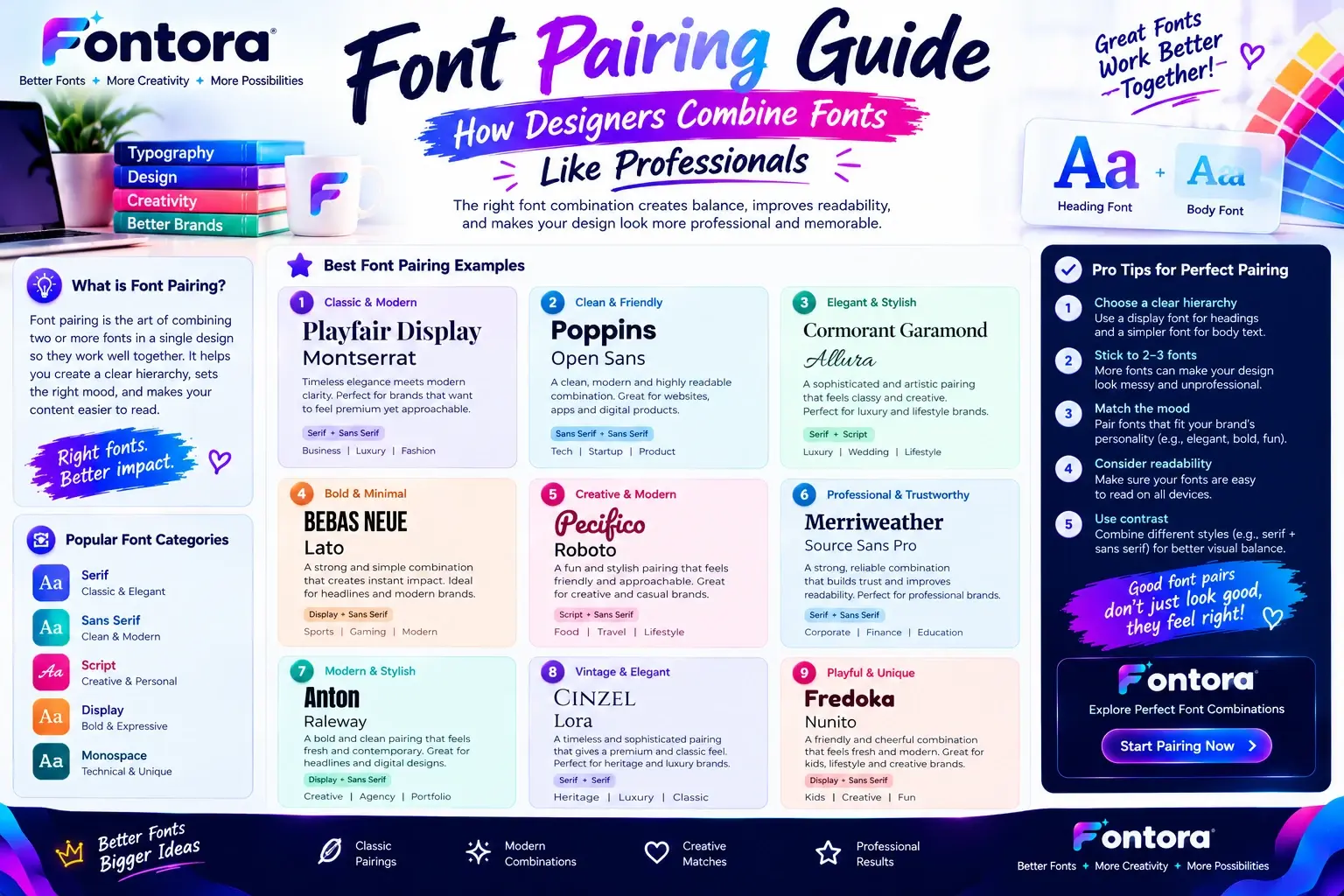
Font Pairing
Font pairing means combining two or more fonts that work well together. Good combinations create balance and make designs more engaging.
A common approach is using:
One font for headings
Another font for body text
The key is choosing fonts that complement each other without making the design confusing.
You can learn more about combining fonts effectively in our font pairing guide.
Why Typography Elements Matter
Each typography element contributes to the overall communication of a design. When these elements work together, text becomes easier to read, visually balanced, and more effective.
A strong typography system helps websites, brands, and digital products create professional experiences that connect with users.
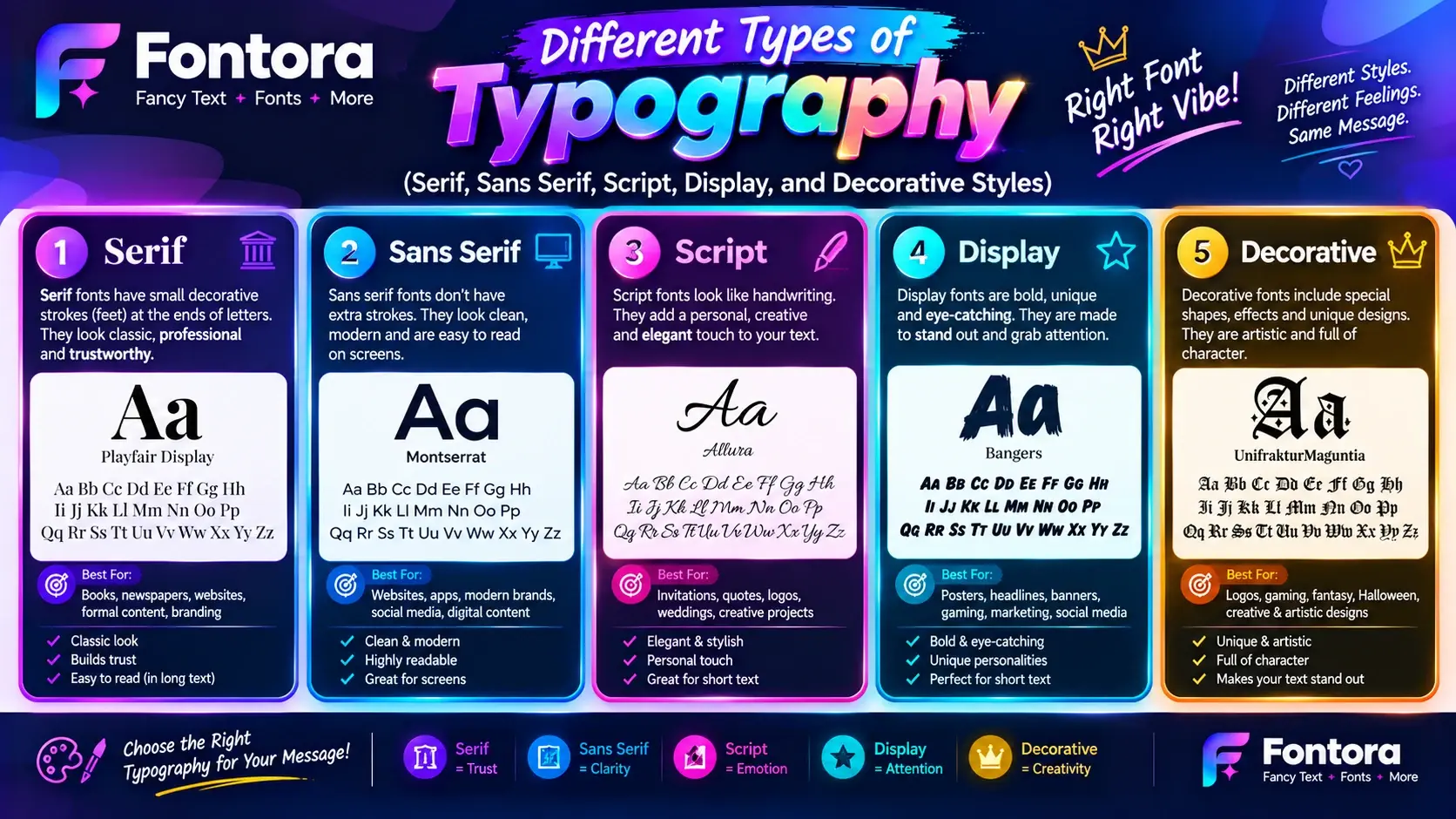
Different Types of Typography (Serif, Sans Serif, Script, Display, and Decorative Styles)
Typography includes many different styles, and each style creates a unique visual feeling. Designers choose typography styles based on the purpose, audience, and message they want to communicate.
Some styles feel traditional and professional, while others feel modern, creative, or playful. Understanding different typography categories helps designers select the right style for websites, branding, social media, and digital projects.
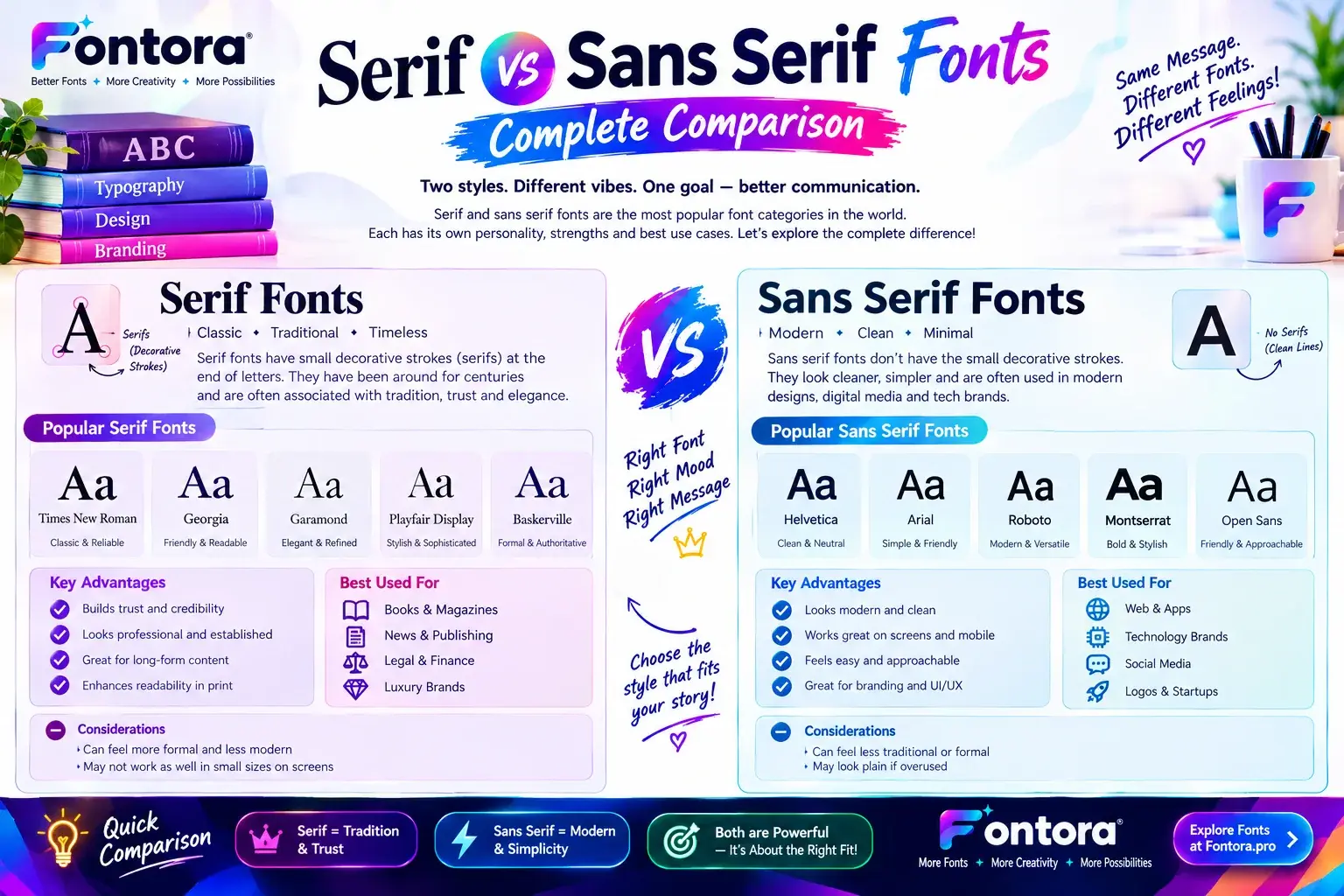
Serif Typography
Serif typography uses small decorative strokes attached to the ends of letters. These details give the letters a classic and elegant appearance.
Serif fonts are often used in:
Books
Newspapers
Magazines
Luxury branding
Professional websites
Serif styles are commonly associated with trust, tradition, and reliability. Many brands use serif typography when they want to create a premium or established image.
Examples of serif fonts include:
Times New Roman
Georgia
Garamond
Serif typography can work especially well for long-form reading because the letter details help create a comfortable reading experience.
Sans Serif Typography
Sans serif typography removes the decorative strokes found in serif fonts. The word "sans" means "without," so sans serif means without serifs.
This style creates a clean, simple, and modern appearance.
Sans serif fonts are widely used in:
Websites
Mobile applications
Software interfaces
Technology brands
Digital products
Popular sans serif fonts include:
Arial
Helvetica
Roboto
Inter
Many modern websites prefer sans serif typography because it provides excellent readability across different screen sizes.
Script Typography
Script typography is inspired by handwriting and calligraphy. These fonts often have flowing letters and creative designs.
Script styles are commonly used for:
Wedding invitations
Fashion brands
Creative projects
Personal logos
Decorative designs
Script typography can add personality and elegance, but it should be used carefully. Long paragraphs written in script fonts can become difficult to read.
Display Typography
Display typography focuses on creating strong visual impact. These fonts are designed to attract attention rather than support long reading.
Display styles are often used for:
Headlines
Posters
Advertisements
Social media graphics
Brand campaigns
A creative display font can make a message memorable and help a design stand out.
Decorative Typography
Decorative typography includes unique and artistic letter styles created for specific themes or creative purposes.
These styles are commonly used in:
Gaming designs
Entertainment content
Event posters
Creative branding
Digital artwork
Decorative fonts can make designs more interesting, but they need careful usage. Too many decorative elements can reduce readability.
Modern Typography Styles
Digital design has introduced many new typography styles that combine creativity with technology. Today, designers experiment with:
Variable fonts
Animated text
Creative digital lettering
Interactive typography
Custom brand typefaces
These modern approaches allow designers to create unique experiences while maintaining clear communication.
You can explore more typography categories and discover different font styles used in modern design.
Typography Examples in Real Life (Websites, Branding, Social Media, and Print)
Typography is not limited to design software or professional projects. We see and interact with typography every day through websites, mobile apps, advertisements, product packaging, and social media platforms.
The way text is designed can influence how people understand information, recognise brands, and interact with digital experiences. Good typography examples show how different text styles create specific emotions and improve communication.
Website Typography Examples
Websites depend heavily on typography because users usually read information through screens. A website needs clear text structure so visitors can quickly understand the content.
Effective website typography usually includes:
Clear headlines
Easy-to-read paragraph fonts
Proper spacing between sections
Strong visual hierarchy
Consistent font styles
For example, a technology website may use clean sans serif typography to create a modern and simple experience. A creative portfolio website may use more artistic styles to highlight personality.
Good typography in web design improves navigation and helps visitors find important information faster.
Brand Typography Examples
Typography is one of the most important parts of brand identity. Companies carefully select fonts because text style can influence how customers view a business.
A brand may use typography to communicate:
Trust
Creativity
Professionalism
Innovation
Luxury
For example:
Luxury brands often use elegant serif styles.
Technology companies usually prefer modern sans serif fonts.
Creative brands may use unique display typography.
Consistent typography across logos, websites, advertisements, and packaging helps customers recognise a brand more easily.
If you want to understand how businesses choose text styles that match their personality, explore our guide on brand fonts.
Social Media Typography Examples
Social media platforms rely on attractive typography to capture attention quickly. Users often scroll through hundreds of posts, so creative text design helps content stand out.
Common uses of typography on social media include:
Instagram quotes
YouTube thumbnails
TikTok captions
Promotional graphics
Profile designs
Creators often use bold, stylish, or decorative text to make posts more engaging. Tools like a fancy text generator help users create unique text styles for social platforms without installing additional fonts.
Print Typography Examples
Before digital design became popular, typography was mainly used in printed materials. Today, print design still depends on strong typography choices.
Common examples include:
Books
Magazines
Posters
Business cards
Brochures
Product packaging
Print designers carefully select fonts, spacing, and layouts to create comfortable reading experiences and attractive visual designs.
Typography in Mobile Applications
Mobile apps require typography that works well on smaller screens. Designers must consider readability, screen size, and user interaction.
Good mobile typography includes:
Simple font choices
Clear button text
Comfortable spacing
Easy-to-read menus
A well-designed app uses typography to guide users through different actions smoothly.
Why Typography Examples Matter
Studying real-world typography examples helps designers understand how text choices affect communication. The right combination of fonts, spacing, and layout can transform ordinary content into a professional and memorable experience.
Typography is not only about making text look good. It is about creating meaningful connections between information and the people who read it.
What Is Typography Design? (Principles, Elements, and Best Practices)
Typography design is the process of creating a clear and visually balanced text experience by combining fonts, spacing, layout, and visual hierarchy. It focuses on making written content easier to read while also expressing a specific style, emotion, or brand message.
Many people think typography design is only about selecting attractive fonts, but professional design requires much more. Designers carefully organise every text element to create harmony between appearance and communication.
A strong typography design helps users understand information faster, improves the overall visual experience, and creates a professional impression.
Key Principles of Typography Design
Good typography follows several important principles that help create effective and attractive designs.
Visual Hierarchy
Visual hierarchy helps readers understand which information is most important. Designers create hierarchy by changing:
Font size
Font weight
Color
Spacing
Position
For example, a large headline immediately tells users the main topic, while smaller supporting text provides additional details.
Without hierarchy, a design can feel confusing because every piece of information appears equally important.
Balance and Alignment
Balance creates a comfortable visual structure. Text should feel organized rather than crowded or uneven.
Alignment helps create consistency by placing text elements in a clear pattern.
Common alignment styles include:
Left alignment
Center alignment
Right alignment
Justified alignment
Most digital content uses left alignment because it creates a natural reading flow.
Contrast
Contrast helps important information stand out. Designers create contrast by using differences in:
Font sizes
Font styles
Colors
Weight
For example, a bold headline combined with lighter body text creates a clear difference between important and supporting information.
White Space
White space refers to the empty areas around text and design elements. It does not mean wasted space. Instead, it improves readability and gives content room to breathe.
Good use of white space helps:
Reduce visual clutter
Improve focus
Create a cleaner design
Guide user attention
Consistency
Consistency makes a design look professional. Using too many unrelated fonts or styles can make content feel unorganised.
A consistent typography system usually includes:
Limited font combinations
Similar heading styles
Matching spacing rules
Repeated design patterns
This is especially important for websites and brands because consistency helps users recognise the visual identity.
Typography Design in Digital Experiences
Modern typography design plays a major role in websites, apps, and online platforms. Designers consider not only appearance but also usability.
Digital typography should focus on:
Mobile readability
Fast scanning
Accessibility
Clear navigation
Comfortable reading
For example, a website may use a bold heading style to capture attention, simple paragraph fonts for reading comfort, and clear buttons to guide user actions.
Typography Design and Brand Communication
Typography can communicate personality without using images or graphics. The right text style can make a brand appear:
Professional
Friendly
Creative
Modern
Trustworthy
This is why companies create specific typography systems that remain consistent across websites, advertisements, packaging, and marketing materials.
How Designers Create Better Typography
Professional designers usually follow these steps:
Understand the purpose of the design.
Identify the target audience.
Select suitable font styles.
Create clear text hierarchy.
Test readability across different devices.
Improve spacing and layout.
Typography design is a combination of creativity and strategy. It helps transform simple words into meaningful visual communication.
Typography in Graphic Design (Role, Benefits, and Practical Uses)
Typography in graphic design is the process of using text as a visual element to communicate ideas, emotions, and messages. Graphic designers do not simply add words to a design. They carefully choose fonts, spacing, sizes, and layouts to make the message clear and visually attractive.
Typography can completely change how a design feels. The same words can appear professional, playful, luxurious, or modern depending on the typography choices.
Why Typography Is Important in Graphic Design
Typography helps designers create a strong connection between visual elements and written information. A good design needs more than beautiful images. Text must also be organised and presented correctly.
Effective typography in graphic design helps with:
Better readability
Stronger visual impact
Clear communication
Brand recognition
Emotional connection
For example, a poster with a bold headline and balanced spacing can quickly attract attention, while poorly arranged text may make the message difficult to understand.
Typography Creates Visual Identity
Every brand has a personality, and typography helps express that personality.
Different font choices create different impressions:
Serif fonts can create a classic and trustworthy feeling.
Sans serif fonts often represent simplicity and modern design.
Script fonts can communicate creativity and elegance.
Decorative fonts can add uniqueness and personality.
Designers carefully select typography that matches the brand's values and target audience.
This connection between fonts and emotions is an important part of design strategy. You can learn more about how text styles influence perception in our guide about font psychology.
Typography in Logos and Branding
Many successful brands use typography as a major part of their identity. A logo is often remembered because of its unique letter style, spacing, and arrangement.
Typography helps brands create:
Recognition
Consistency
Professional appearance
Customer trust
A strong typography system ensures that a brand looks consistent across:
Websites
Social media
Advertisements
Packaging
Marketing materials
Typography in Posters and Marketing Designs
Posters, advertisements, and promotional materials depend heavily on typography because they need to communicate quickly.
Designers often use:
Large headlines
Creative font combinations
Strong contrast
Eye-catching layouts
The goal is to capture attention and deliver the message within a few seconds.
Typography and Digital Content Creation
Today, typography is widely used by:
Content creators
Social media managers
Video editors
Website designers
Marketers
Digital platforms require text that is attractive and easy to understand. Creative text styles can help posts, videos, and graphics gain more attention.
Common Typography Mistakes in Graphic Design
Beginners often make these mistakes:
Using Too Many Fonts
Combining too many unrelated fonts can make a design look confusing.
Ignoring Readability
A beautiful font is not useful if people cannot easily read the message.
Poor Spacing
Incorrect spacing between letters, lines, or sections can reduce the quality of a design.
Choosing Fonts Without Purpose
Every font choice should support the message and audience.
How Designers Improve Typography Skills
Designers improve their typography skills by studying:
Font combinations
Layout principles
Brand designs
User behaviour
Professional examples
Exploring different font styles can help beginners understand how various type categories are used in real projects.
Typography in Web Design (Best Practices, Readability, and User Experience)
Typography in web design is the process of using text styles, fonts, spacing, and layouts to create a clear and enjoyable experience for website visitors. Since most online users interact with information through screens, good typography helps them understand content quickly and navigate websites more easily.
A website can have excellent information, but poor text design can make visitors leave. Effective typography improves readability, creates visual structure, and helps users focus on the most important information.
Why Typography Matters in Web Design
Typography is one of the most important parts of website design because text is the main way users consume information online.
Good web typography helps:
Improve readability
Reduce user confusion
Guide visitors through pages
Create a professional appearance
Increase engagement
For example, a blog with clear headings, comfortable paragraph spacing, and readable fonts allows users to scan information faster and find answers more easily.
Choosing the Right Fonts for Websites
Choosing suitable fonts is one of the first steps in creating effective web typography. A website font should match the purpose of the site while remaining easy to read.
When selecting fonts, designers consider:
Audience expectations
Brand personality
Screen readability
Device compatibility
Loading performance
For example:
A business website may use clean and professional fonts.
A creative portfolio may use unique display styles.
A news website may prioritise highly readable fonts.
The goal is not only to make text attractive but also to create a comfortable reading experience.
Mobile-Friendly Typography
Today, many users browse websites on mobile devices. Typography must adapt to different screen sizes to maintain readability.
Good mobile typography includes:
Appropriate font sizes
Shorter text blocks
Clear headings
Comfortable spacing
Easy-to-read buttons
A design that works well on a desktop screen may need adjustments for smaller devices.
Typography and Website User Experience
Typography directly affects user experience because it influences how people interact with content.
A strong typography system helps users:
Understand page structure
Find important information
Read content comfortably
Complete actions easily
For example, clear headings allow visitors to scan an article, while properly designed buttons help users understand where to click.
Typography Hierarchy for Websites
A website usually contains different levels of text, and each level has a specific purpose.
Common hierarchy includes:
Main Heading (H1)
Introduces the main topic of the page.
Subheadings (H2 and H3)
Organise sections and improve content structure.
Body Text
Provides detailed information.
Supporting Text
Includes captions, labels, and additional details.
This structure helps both users and search engines understand the content organization.
Web Typography and SEO
Typography does not directly decide search rankings, but it affects important user experience factors.
Better typography can improve:
Reading time
Content engagement
User satisfaction
Page usability
Search engines prefer content that is easy for users to understand. A clear structure with proper headings, readable text, and organised information supports better content performance.
Best Practices for Website Typography
Follow these practices for better web typography:
Use readable fonts.
Maintain proper contrast between text and background.
Avoid using too many font styles.
Keep paragraphs easy to scan.
Create clear heading structures.
Optimise typography for mobile devices.
Good typography makes websites more accessible, professional, and enjoyable for visitors.
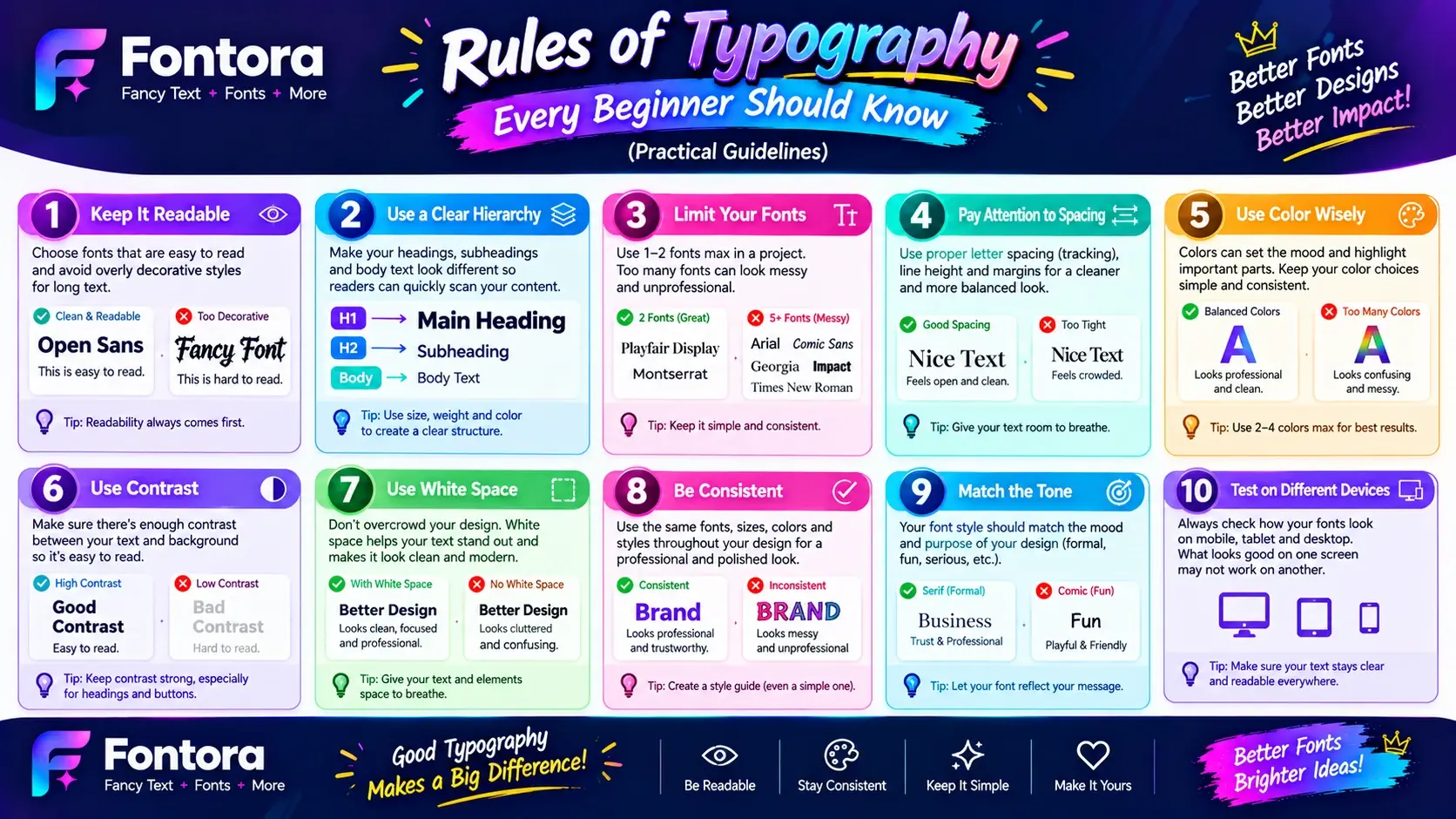
Rules of Typography Every Beginner Should Know (Practical Guidelines)
Creating effective typography requires more than choosing attractive fonts. Designers need to understand how text elements work together to create clear, balanced, and meaningful communication.
Whether you are designing a website, social media post, logo, or marketing material, following basic typography rules helps your content look professional and improves the reading experience.
1. Choose Fonts Based on Purpose
Every font creates a different feeling. The right choice depends on the message, audience, and platform.
Before selecting a font, ask:
What type of content am I creating?
Who will read it?
What feeling should the design communicate?
For example, a professional company website may need clean and trustworthy typography, while a creative project may benefit from a more unique style.
A common mistake beginners make is choosing fonts only because they look attractive. A good font should also support readability and communication.
2. Limit the Number of Fonts
Using too many fonts in one design can make the content look unorganised and confusing.
Most professional designs use a small number of fonts, such as:
One font for headings
One font for body text
Optional accent font for special elements
A balanced combination creates consistency and makes the design easier to follow.
3. Create Clear Text Hierarchy
Text hierarchy helps readers understand the importance of different information.
A strong hierarchy usually includes:
Large and bold main headings
Smaller section headings
Comfortable body text
Highlighted important details
This allows users to scan content quickly and find the information they need.
4. Focus on Readability
A beautiful design is not useful if people cannot easily read the text.
To improve readability:
Use appropriate font sizes
Keep enough spacing between lines
Avoid overly complex fonts for long paragraphs
Maintain strong contrast between text and background
Readable typography creates a better experience for users across all devices.
5. Maintain Proper Spacing
Spacing is one of the most important parts of typography. The space between letters, words, and lines affects how comfortable text feels.
Important spacing areas include:
Letter spacing
Line height
Paragraph spacing
Margins
Good spacing makes content feel organised and prevents a crowded appearance.
6. Use Contrast Effectively
Contrast helps important information stand out. Designers can create contrast through:
Font size differences
Bold and regular text
Different font styles
Colour choices
For example, a bold headline with lighter body text creates a clear visual difference between important and supporting information.
7. Keep Typography Consistent
Consistency helps users recognise patterns and understand content faster.
A consistent typography system uses:
Similar heading styles
Repeated font choices
Matching spacing rules
Organised layouts
This is especially important for businesses because consistent typography strengthens brand recognition.
8. Consider Mobile Users
Typography should work well on every screen size. A design that looks good on a desktop may not provide the same experience on mobile devices.
Always consider:
Responsive font sizes
Shorter text blocks
Easy-to-tap buttons
Clear navigation text
Mobile-friendly typography improves accessibility and user satisfaction.
9. Test Before Publishing
Professional designers test typography before finalising a project.
Check:
Is the text easy to read?
Does the hierarchy make sense?
Do fonts match the message?
Does it work on different devices?
Testing helps identify problems and improves the final design quality.
10. Keep Typography Simple
The best typography is usually simple and purposeful. Adding too many effects, styles, or decorative elements can distract users from the message.
Good typography focuses on:
Clear communication
Better readability
Visual balance
User experience
Following these typography rules helps beginners create designs that look professional and communicate effectively.
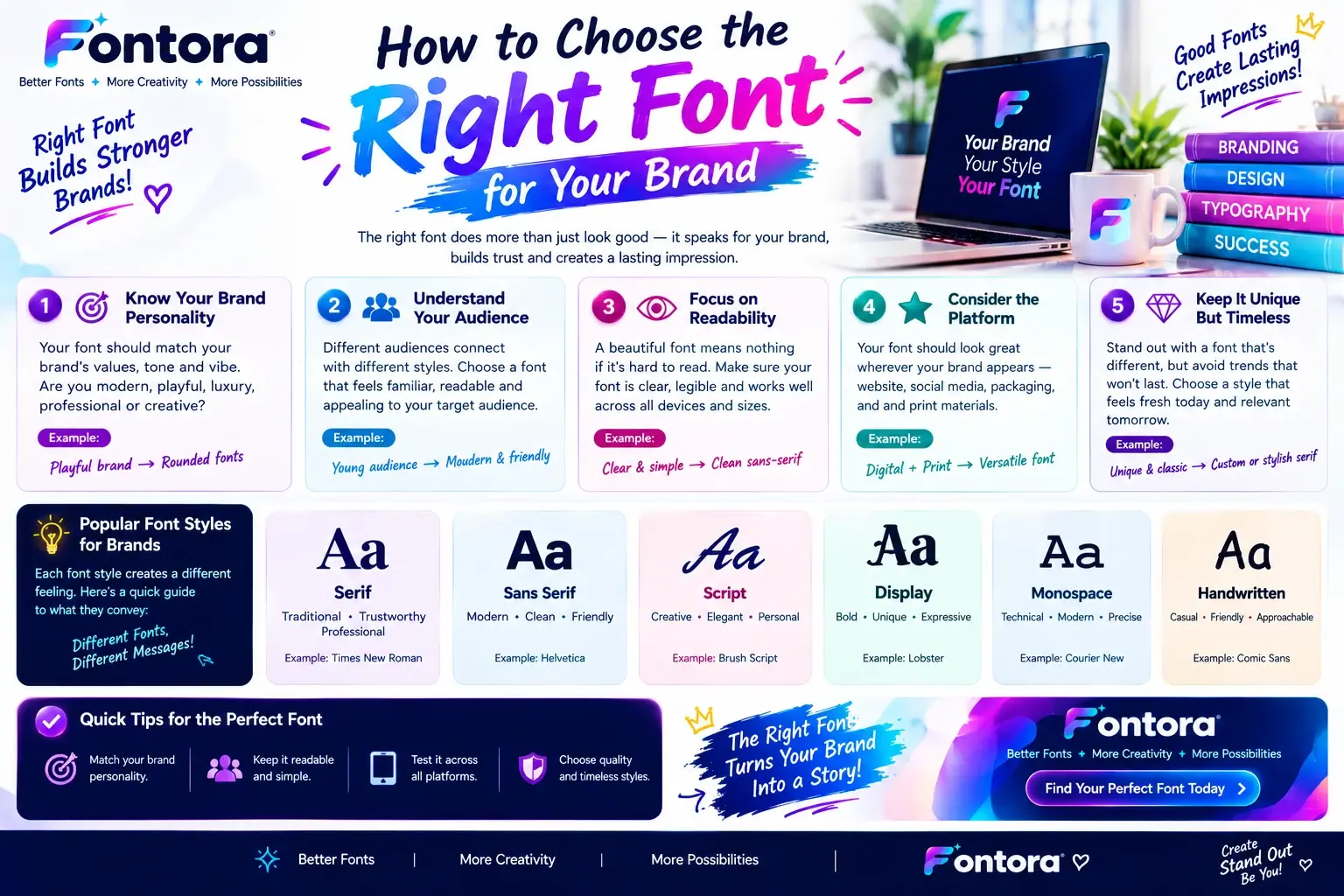
How To Choose The Right Typography Style (Step-by-Step Guide)
Choosing the right typography style is an important step in creating a successful design. The best choice depends on the purpose of the project, target audience, brand personality, and where the text will appear.
A suitable typography style makes content easier to understand and helps create the right impression. A poor choice can make a design feel confusing, outdated, or difficult to read.
Whether you are designing a website, logo, social media post, or marketing material, these steps can help you select typography that matches your goals.
1. Understand Your Purpose
The first step is identifying why you need typography.
Different projects require different styles.
For example:
A business website may need professional and trustworthy typography.
A children's brand may need playful and friendly styles.
A luxury brand may use elegant and premium-looking fonts.
A gaming project may require bold and creative designs.
Understanding the purpose helps you avoid choosing fonts only based on appearance.
2. Know Your Audience
Your audience should influence your typography decisions.
Ask yourself:
Who will read this content?
What style will connect with them?
What emotions should the design create?
A younger audience may respond well to creative and modern styles, while professional audiences may prefer simple and clean typography.
Good typography creates a connection between the message and the people receiving it.
3. Match Typography With Brand Personality
Typography should represent the personality of a brand.
Different styles communicate different feelings:
Serif styles often appear classic and reliable.
Sans serif styles feel modern and simple.
Script styles create an elegant and personal touch.
Decorative styles create a unique visual identity.
Businesses often create specific font systems to maintain consistency across their websites, advertisements, and digital platforms.
4. Consider Readability
A visually attractive font is not always the best choice. The main purpose of typography is communication.
Before selecting a style, check:
Is it easy to read?
Does it work in different sizes?
Is spacing comfortable?
Does it remain clear on mobile devices?
For long-form content, simple and readable fonts usually provide the best experience.
5. Choose Fonts That Work Together
Many designs use more than one font. Combining fonts correctly creates balance and improves visual appeal.
Common combinations include:
Bold heading font + simple body font
Creative display font + clean supporting font
Serif heading + sans serif paragraph text
Good combinations should create contrast while maintaining harmony.
You can learn more about combining different text styles in our font pairing guide.
6. Think About The Platform
The platform where your typography appears also matters.
Different platforms have different requirements:
Websites
Need readable fonts, clear headings, and responsive text.
Social Media
Often uses eye-catching and creative text styles.
Logos
Require memorable and recognisable typography.
Mobile Apps
Need simple and accessible text designs.
Choosing typography based on the platform creates a better user experience.
7. Test Different Typography Options
Before finalising a design, compare different styles.
Test:
Different font combinations
Heading sizes
Text spacing
Mobile appearance
User readability
Small adjustments can significantly improve the final result.
8. Use Typography Tools For Inspiration
Modern typography tools help designers explore different styles quickly. They can generate ideas, compare options, and help users understand how different text appearances work.
Tools like font generators allow creators to experiment with:
Creative text styles
Different font appearances
Decorative designs
Social media text formats
If you want to explore creative text options, you can try the font generator to discover different typography possibilities.
Final Tips For Choosing Typography
A good typography choice should be:
Easy to read
Suitable for the audience
Consistent with the brand
Appropriate for the platform
Visually balanced
The goal of typography is not simply to make text look beautiful. It is to create a clear and meaningful communication experience.
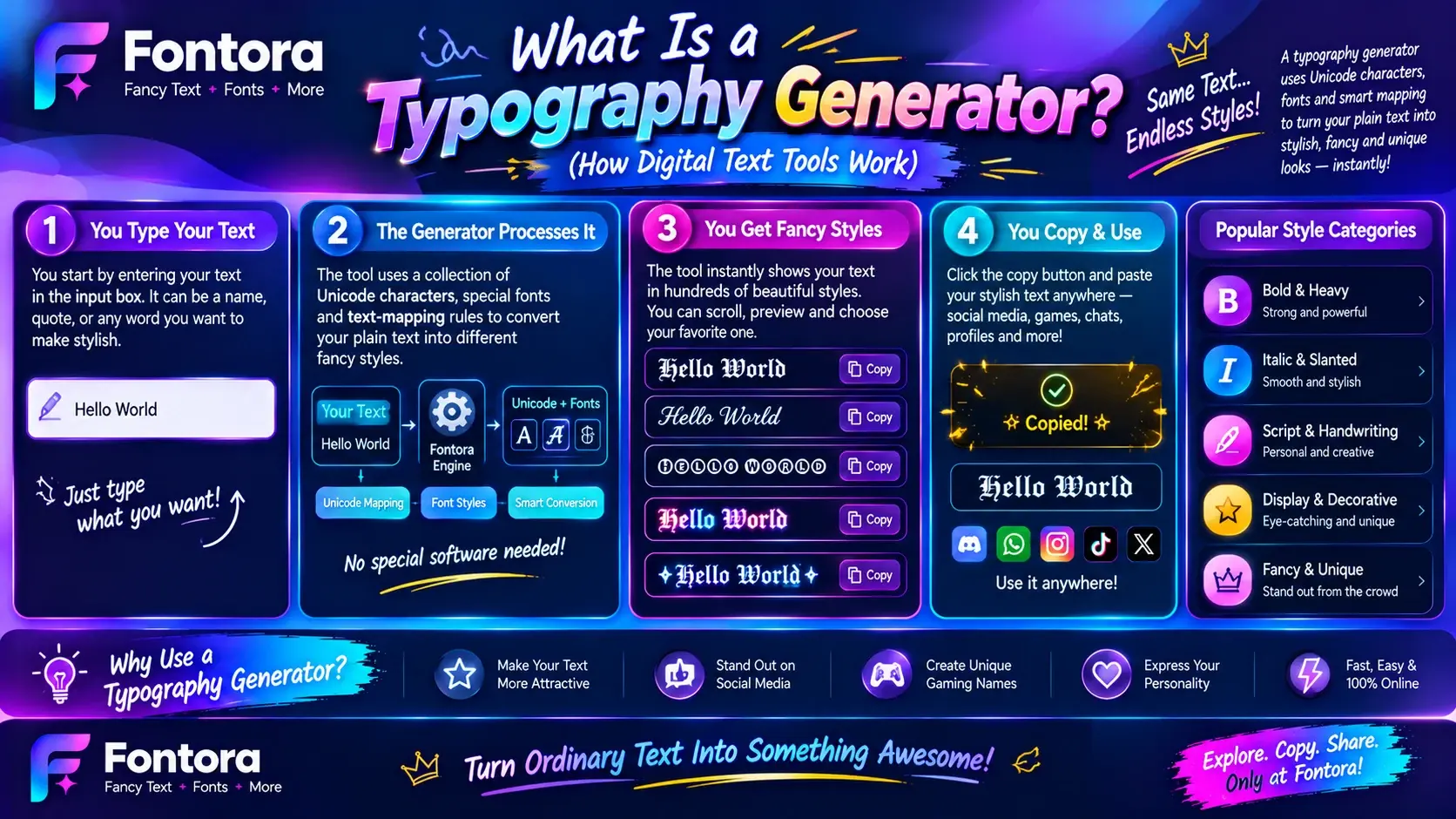
What Is a Typography Generator? (How Digital Text Tools Work)
A typography generator is an online tool that helps users create different text styles by transforming normal text into creative and visually unique designs. These tools allow users to explore different letter appearances, styles, and formatting options without manually designing every character.
Modern typography generators are useful for designers, content creators, marketers, and social media users who want to create attractive text quickly.
Unlike traditional design software, online typography tools provide a simple way to experiment with text styles directly from a browser.
How Does a Typography Generator Work?
A typography generator works by applying different text styles, character variations, and design options to regular input text.
The process usually includes:
Entering your text into the tool.
Selecting a preferred style or appearance.
Generating different text variations.
Copying or using the final design.
These tools help users create unique text for:
Social media profiles
Websites
Logos
Gaming usernames
Marketing content
Digital artwork
Typography Generators and Digital Text Styles
Modern digital text tools use different techniques to create unique appearances. Some tools work with traditional font rendering, while others use special character systems to create copy-and-paste text styles.
For example, a user may transform:
Normal Text:
Creative Design
Into styles like:
Bold Style:
𝐂𝐫𝐞𝐚𝐭𝐢𝐯𝐞 𝐃𝐞𝐬𝐢𝐠𝐧
Small Text Style:
ᶜʳᵉᵃᵗⁱᵛᵉ ᵈᵉˢⁱᵍⁿ
Decorative Style:
✦ Creative Design ✦
These variations help users create more engaging digital content.
Typography Generator vs Traditional Font Tools
A typography generator and a traditional font tool serve different purposes.
Traditional font tools are mainly used by designers who need professional control over:
Font files
Layout systems
Brand design
Print projects
Typography generators focus on quick creation and experimentation.
They are useful when users need:
Fast text styling
Creative ideas
Social media-ready text
Copy-and-paste designs
For more advanced font exploration, you can also learn about different font generator tools and how they help designers create customised text styles.
Benefits of Using a Typography Generator
Typography generators provide several advantages:
Saves Time
Users can create different text styles within seconds instead of manually designing each letter.
Helps Generate Ideas
Designers and creators can explore different styles before selecting a final direction.
Makes Text More Engaging
Creative typography can make usernames, posts, headlines, and digital content stand out.
Easy for Beginners
Users do not need advanced design skills to experiment with typography styles.
Where Can You Use Typography Generators?
Typography generators are commonly used across many digital platforms.
Social Media
Creators use stylish text for:
Instagram bios
TikTok profiles
Social media captions
Gaming Communities
Players create unique usernames and profile names using creative text styles.
Branding Projects
Small businesses and creators use generated text ideas for logos, banners, and promotional content.
Websites and Digital Content
Writers and designers use typography tools to create attractive headings and visual elements.
How Fontora Helps With Typography Creation
Fontora makes exploring creative text styles easier by helping users discover different typography possibilities in one place.
With tools designed for modern creators, users can experiment with:
Fancy text styles
Creative letter designs
Unique text formats
Social media-friendly typography
You can explore more about how these tools work in our guide on what is a fancy text generator.
Tips for Using Typography Generators Effectively
To create better results:
Choose styles that match your purpose.
Keep readability in mind.
Avoid using too many decorative effects.
Select styles that fit your audience.
Use creative text where it adds value.
A typography generator is not a replacement for professional design principles. Instead, it is a helpful tool that makes experimenting with text styles faster and easier.
Modern Typography Trends (AI, Variable Fonts, Minimal Design, and Future of Typography)
Typography continues to evolve as technology and design trends change. Today, designers are not only focused on choosing attractive fonts but also creating flexible, interactive, and user-friendly text experiences.
Modern typography combines creativity with technology. From responsive websites to AI-powered design tools, new approaches help creators produce text that is more engaging, accessible, and adaptable.
Understanding current trends helps designers, marketers, and content creators create designs that feel fresh and relevant.
Variable Fonts
Variable fonts are one of the biggest developments in modern typography. Unlike traditional font files that require separate files for different weights and styles, variable fonts allow designers to adjust multiple characteristics within a single font file.
A variable font can control:
Font weight
Width
Slant
Style variations
This provides more flexibility while keeping websites faster and more efficient.
For web designers, variable fonts help create responsive designs that work smoothly across different screen sizes.
Minimal Typography
Minimal typography focuses on simplicity, clarity, and clean design. Many modern websites and brands use fewer fonts and simpler layouts to create a better user experience.
Minimal typography usually includes:
Clean font choices
Strong spacing
Simple color combinations
Clear text hierarchy
The goal is to remove unnecessary elements and help users focus on the main message.
Bold and Creative Headlines
Modern designs often use large, bold headlines to capture attention quickly. This trend is popular in:
Website landing pages
Digital advertisements
Social media graphics
Brand campaigns
Creative headlines combined with strong typography can create memorable first impressions.
Responsive Typography
As users browse websites on different devices, typography must adapt to various screen sizes.
Responsive typography ensures that text remains:
Readable on mobile devices
Balanced on desktop screens
Properly structured across platforms
Designers use flexible sizing, spacing adjustments, and responsive layouts to maintain a consistent experience.
AI and Typography Design
Artificial intelligence is changing how designers explore and create typography. AI-powered tools can help users generate ideas, discover styles, and experiment with different text appearances.
AI tools can assist with:
Font recommendations
Style inspiration
Text variations
Creative design concepts
However, human creativity and design judgment remain important. Tools can provide ideas, but designers still decide what works best for the audience and purpose.
Personalised Typography Experiences
Modern digital platforms are moving toward more personalised experiences. Typography can be adjusted based on:
User preferences
Device type
Accessibility needs
Reading conditions
This creates more comfortable and inclusive digital experiences.
Interactive Typography
Interactive typography uses movement and digital effects to make text more engaging.
Examples include:
Animated headlines
Hover effects
Dynamic text elements
Motion-based designs
This style is common in creative websites and digital experiences where designers want to attract user attention.
The Future of Typography
The future of typography will continue combining design, technology, and user experience. New tools will make typography creation easier, while designers will continue focusing on clarity, creativity, and meaningful communication.
Whether you are creating a website, social media content, or brand identity, understanding modern typography trends helps you make better design decisions.
Conclusion: Why Typography Matters in Modern Design
Typography is much more than selecting attractive fonts. It is a powerful design element that helps people understand information, recognise brands, and connect with digital experiences. From websites and mobile apps to advertisements and social media content, effective typography improves communication and creates a stronger visual impact.
A successful typography system combines font selection, spacing, hierarchy, alignment, and layout to make content clear and enjoyable to read. Whether you are a designer, business owner, or content creator, understanding typography helps you create professional and meaningful designs.
Modern tools make exploring text styles easier than ever, but good design still depends on understanding your audience, purpose, and message. By applying the right principles, you can create typography that not only looks good but also delivers a better user experience.
Explore more creative design resources and discover how different typography tools can help you experiment with modern text styles and improve your digital projects.
Frequently Asked Questions About Typography
What is typography?
Typography is the process of arranging and designing text to make written information clear, readable, and visually appealing. It includes choosing fonts, adjusting spacing, creating hierarchy, and organising layouts. Designers use typography in websites, branding, advertisements, books, and digital products to improve communication.
What is the difference between typography and fonts?
Typography is the complete system of designing and arranging text, while fonts are only one part of typography. A font controls the appearance of letters, but typography also includes spacing, alignment, size, layout, and visual hierarchy to create a better reading experience.
Why is typography important in design?
Typography is important because it improves readability, creates a visual structure, and helps users understand information faster. Good typography also strengthens brand identity by creating a consistent style across websites, marketing materials, applications, and digital platforms.
What are the main elements of typography?
The main elements of typography include typeface, font size, letter spacing, line height, alignment, contrast, and visual hierarchy. These elements work together to create text that is easy to read, visually balanced, and effective for communication.
What are the different types of typography?
The common types of typography include serif, sans serif, script, display, and decorative styles. Each type creates a different feeling and purpose. Serif styles often appear traditional, sans serif styles look modern, script styles feel creative, and display styles attract attention.
What is typography design?
Typography design is the process of arranging text elements to create a clear and attractive visual experience. It involves selecting suitable fonts, organising layouts, managing spacing, and creating hierarchy so that content becomes easier to understand and more engaging.
How is typography used in web design?
Typography in web design helps organise website content and improve user experience. Designers use different font sizes, headings, spacing, and layouts to make pages easier to scan, readable on different devices, and visually consistent.
How does typography affect branding?
Typography affects branding by influencing how people recognise and feel about a company. Different font styles can communicate emotions such as trust, creativity, luxury, or simplicity. Brands use consistent typography across logos, websites, advertisements, and packaging to build recognition.
What is a typography generator?
A typography generator is an online tool that helps users create different text styles quickly. It can generate creative text designs, font variations, and decorative styles for websites, social media profiles, usernames, and digital content without requiring advanced design skills.
How do I choose the right typography style?
Choose a typography style based on your purpose, audience, brand personality, and platform. Consider readability, font combinations, spacing, and overall design goals. The best typography style should look attractive while making the message easy to understand.