 By Hamza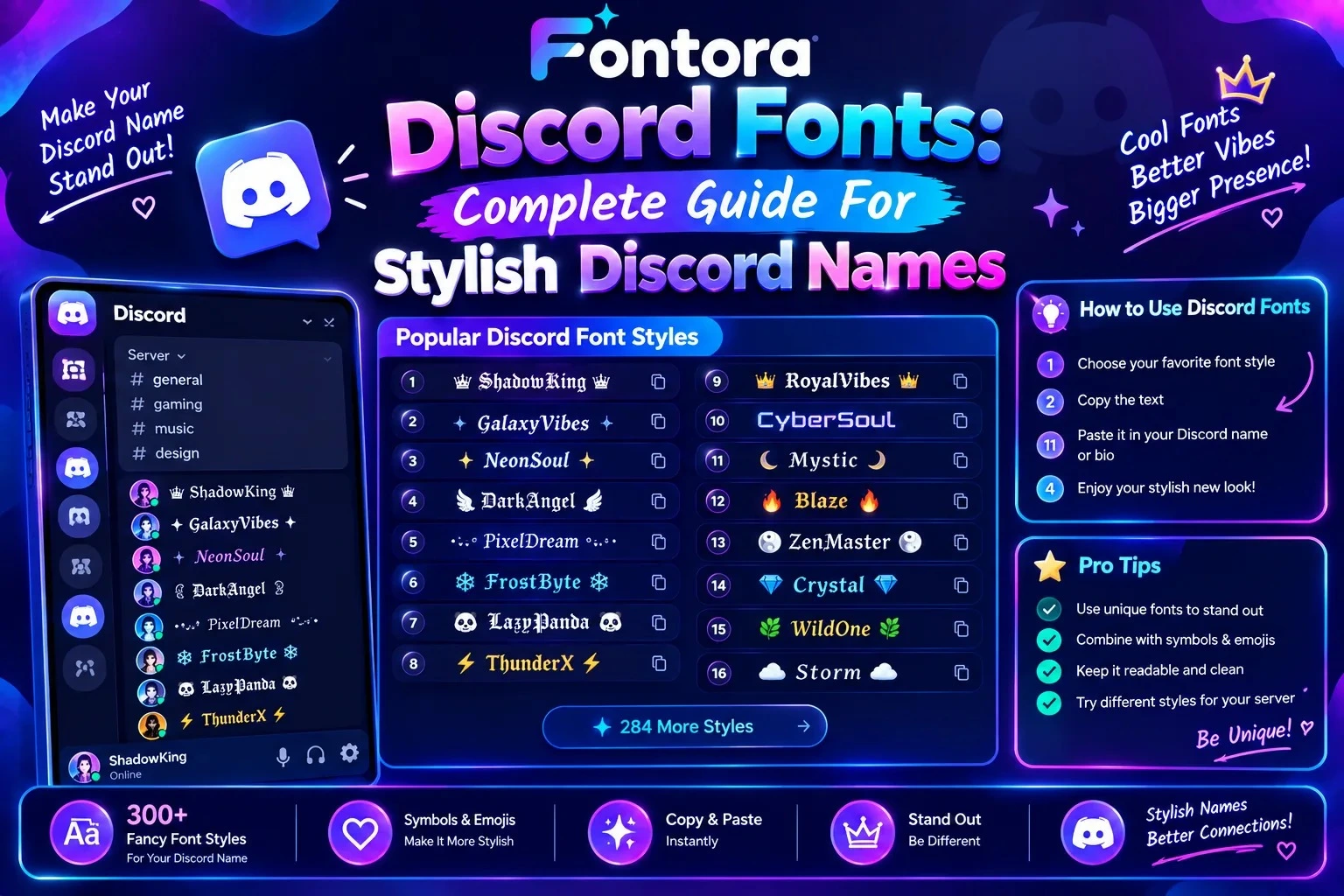
Discord fonts are stylish text designs created using Unicode characters that allow users to customise usernames, server names, and messages without installing additional fonts. Users can convert normal text into different styles, copy the generated text, and paste it directly into Discord.
Discord Fonts: Complete Guide For Stylish Discord Names
Introduction
Discord users are always looking for creative ways to make their profiles, usernames, and communities more unique. Discord fonts provide an easy way to transform normal text into stylish designs that help users create memorable names and profiles. Many users now customise their Discord usernames with fancy fonts and symbols to make them more attractive and different from ordinary names.
These text styles are created using Unicode characters instead of traditional font files, allowing users to generate different designs and copy them directly into Discord. Whether you are a gamer, community owner, content creator, or casual Discord user, the right text style can improve your online identity.
In this guide, you will learn how Discord fonts work, why people use fancy text styles, how to create stylish Discord names, and how different font styles can make your profile stand out.
What Are Discord Fonts?
Discord fonts are creative text styles that help users customise the appearance of their Discord profiles, usernames, and communities. They allow ordinary letters to appear in different designs, making names and messages more unique compared to standard Discord text.
Although they are commonly called Discord fonts, most of these styles are not actual font files. Instead, they are created using Unicode characters that look similar to different font designs. These characters are supported by many online platforms, including Discord, which allows users to copy and use them easily.
For example:
Normal text:
Shadow Gamer
Discord font style:
𝕾𝖍𝖆𝖉𝖔𝖜 𝙂𝖆𝖒𝖊𝖗
Another style:
𝐒𝐡𝐚𝐝𝐨𝐰 𝐆𝐚𝐦𝐞𝐫
Another style:
𝓢𝓱𝓪𝓭𝓸𝔀 𝓖𝓪𝓶𝓮𝓻
The message remains the same, but the characters are replaced with different Unicode versions that create a unique visual appearance.
Discord fonts are popular because users can improve their online identity without downloading software or changing Discord settings. Gamers, server owners, creators, and communities use these styles to make their profiles more attractive and recognisable.
Common uses of Discord fonts include:
Usernames to create unique gaming identities
Server names to make communities stand out
Channel names to organise Discord servers creatively
Role names to add personality and style
Messages to highlight important information
However, good Discord font usage requires balance. Extremely decorative text may look interesting but can become difficult to read. The best styles combine creativity with clarity, allowing other users to understand the name or message easily.
How Do Discord Fonts Work?
Discord fonts work by converting normal text into Unicode characters that visually look like different font styles. Instead of changing Discord’s default font system, these tools replace regular letters with special characters that can be displayed across different platforms.
When users enter text into a Discord Font Generator, each letter is matched with a different Unicode character style. The generated result can then be copied and pasted directly into Discord usernames, server names, messages, and profile sections.
For example:
Normal text:
Gaming Warrior
Converted Discord font:
𝙂𝙖𝙢𝙞𝙣𝙜 𝙒𝙖𝙧𝙧𝙞𝙤𝙧
The meaning of the text stays the same, but the appearance changes because the original letters are replaced with different Unicode versions.
Unicode Characters Explained
Unicode is a universal character system that allows computers and websites to display thousands of different characters, symbols, and writing systems.
Normal letters:
A B C D
Unicode-style characters:
𝐀 𝐁 𝐂 𝐃
𝓐 𝓑 𝓒 𝓓
𝔄 𝔅 𝔇
Discord font generators use these Unicode characters to create different text appearances without requiring users to install any font files.
This is the reason users can create stylish Discord names instantly and use them across different devices.
The Text Transformation Process
Creating stylish Discord text is a simple process that happens in a few steps.
Step 1: Enter Your Text
First, users type the name, word, or message they want to customise.
Example:
Dark Knight
Step 2: Convert Text Into Unicode Styles
The generator automatically replaces normal letters with different Unicode character versions.
Example:
Normal:
Dark Knight
Generated:
𝕯𝖆𝖗𝖐 𝕶𝖓𝖎𝖌𝖍𝖙
The text now has a different visual style while keeping the same meaning.
Step 3: Copy and Paste Into Discord
After selecting a preferred style, users can copy the generated text and add it to different Discord areas, including:
Usernames
Server names
Channel names
Role names
Messages
No additional software, font installation, or Discord settings changes are required.
Are Discord Fonts Real Fonts?
Although people commonly call them Discord fonts, most of these styles are not traditional font files.
Real fonts are files that are installed on a device and used by applications such as graphic design software, documents, and websites.
Examples include:
Arial
Helvetica
Times New Roman
Discord fonts work differently because they use Unicode characters that already exist in the Unicode system. They simply replace standard letters with visually different characters.
For example, a designer creating a logo may need to install a font file, but a Discord user can create a stylish username by copying Unicode-based text directly into their profile.
Understanding this difference helps users know that Discord fonts are mainly designed for quick customisation, profile decoration, and online identity rather than professional typography.
Why Do People Use Discord Fonts?
Discord is one of the most popular platforms for gaming communities, online groups, and creators. Since millions of users create profiles and communities every day, many people use Discord fonts to make their usernames, server names, and messages look more unique and memorable. Users often explore creative examples through Discord Names With Fancy Fonts to find ideas for unique profiles and communities.
Stylish text helps users express their personality, build an online identity, and create a better visual experience for people who visit their profiles or communities.
To Create a Unique Discord Identity
Many Discord users want their profiles to feel different from ordinary accounts. A creative username can help communicate personality, interests, or gaming style.
For example:
A normal username:
Shadow Warrior
A stylish Discord name:
𝕾𝖍𝖆𝖉𝖔𝖜 ⚔ 𝖂𝖆𝖗𝖗𝖎𝖔𝖗
The text style does not change the username meaning, but it creates a stronger visual impression.
Gamers, creators, and community members often use unique text styles to make their profiles easier to recognise.
To Customise Gaming Profiles
Gaming communities are one of the biggest users of stylish Discord text. Players can also explore different Gaming Fonts to create usernames that match their gaming personality and style.
Discord fonts are commonly used for:
Gaming usernames
Team names
Clan names
Server identities
Profile descriptions
Different styles can create different feelings:
Bold fonts can look powerful and competitive.
Gothic fonts can create a dark or mysterious gaming style.
Glitch fonts can match futuristic or cyber themes.
Cursive fonts can create an elegant appearance.
Choosing the right style helps users create a profile that matches their gaming identity.
To Make Discord Servers More Attractive
Discord server owners also use fancy text to improve the appearance of their communities.
Stylish fonts can be used for:
Server names
Category names
Channel names
Rules sections
Role names
For example:
Normal channel name:
General Chat
Styled channel name:
✦ 𝙂𝙚𝙣𝙚𝙧𝙖𝙡 𝘾𝙝𝙖𝙩 ✦
A well-organised and visually appealing server can create a better experience for members and make the community feel more professional.
To Highlight Important Messages
Some users apply fancy text styles to make specific messages or announcements stand out.
Examples:
Event announcements
Community updates
Special roles
Important notices
However, using too many decorative characters can make messages harder to read. The best approach is to use stylish text where it improves visibility without reducing clarity.
To Build Personal and Community Branding
Discord is not only used for gaming. Many creators, businesses, developers, and online communities use the platform to connect with audiences.
A consistent text style can help create a recognisable identity.
Examples:
A gaming community may use bold and dramatic fonts.
A creative community may use artistic styles.
A professional community may prefer simple and clean designs.
The right Discord font style should match the purpose of the profile or server.
To Stand Out in Online Communities
First impressions matter in online spaces. A unique username or server design can help users attract attention and create a memorable presence.
However, the best Discord profiles combine:
A meaningful name
A suitable font style
Clear readability
A consistent theme
Discord fonts are a simple way to add creativity while keeping profiles and communities personalised.
Popular Discord Font Styles
Discord users have different preferences when customising their usernames, profiles, and communities. Some prefer clean and professional styles, while others choose bold, dramatic, or creative designs.
Different Discord font styles can create different impressions depending on the personality or theme of the user. Below are some of the most popular styles used for Discord names and profiles.
Bold Discord Fonts
Bold fonts are one of the most commonly used styles because they are easy to read while still looking powerful and noticeable.
They are popular among:
Gamers
Team members
Community owners
Competitive players
Bold styles create a strong and confident appearance.
Example:
Normal text:
Shadow Warrior
Bold Discord style:
𝐒𝐡𝐚𝐝𝐨𝐰 𝐖𝐚𝐫𝐫𝐢𝐨𝐫
This style works well for usernames, server roles, and important announcements because the text remains clear.
Cursive Discord Fonts
Cursive fonts create a smooth and elegant appearance. They are often used by users who want a creative or aesthetic profile style.
Cursive Discord fonts are suitable for:
Personal profiles
Creative communities
Artistic usernames
Aesthetic themes
Example:
Normal text:
Creative Soul
Cursive style:
𝓒𝓻𝓮𝓪𝓽𝓲𝓿𝓮 𝓢𝓸𝓾𝓵
This style gives a softer and more artistic feeling compared to bold or gothic designs.
Gothic Discord Fonts
Gothic fonts are popular among users who prefer dark, mysterious, or fantasy-inspired designs. You can explore more styles and examples in our Gothic Fonts guide.
They are commonly used for:
Gaming usernames
Horror themes
Fantasy communities
Dark aesthetic profiles
Example:
Normal text:
Dark Knight
Gothic style:
𝕯𝖆𝖗𝖐 𝕶𝖓𝖎𝖌𝖍𝖙
Gothic text can create a strong visual identity, especially for gaming profiles and themed Discord servers.
Glitch Discord Fonts
Glitch fonts create a digital, distorted, or futuristic appearance. Learn more about this unique style in our Glitch Fonts guide.They are commonly associated with cyber themes and modern gaming styles.
Popular uses include:
Cyberpunk usernames
Tech communities
Gaming profiles
Futuristic designs
Example:
Normal text:
Cyber Warrior
Glitch style:
C̷y̷b̷e̷r̷ W̷a̷r̷r̷i̷o̷r̷
Glitch styles attract attention because they create a unique visual effect that looks different from normal text.
Small Discord Text
Small text styles create a minimal and compact appearance. They are useful when users want a simple decorative effect without making their names too large or complex.
Common uses:
Short usernames
Profile descriptions
Status messages
Minimal designs
Example:
Normal text:
Gaming Mode
Small text style:
ᴳᵃᵐⁱⁿᵍ ᴹᵒᵈᵉ
This style works well for users who prefer a clean and subtle look.
Bubble Discord Fonts
Bubble fonts create a playful and friendly appearance. They are often used by users who want cute or fun profile designs.
Popular among:
Casual communities
Creative users
Anime fans
Social groups
Example:
Normal text:
Happy Gamer
Bubble style:
ⓗⓐⓟⓟⓨ ⓖⓐⓜⓔⓡ
Decorative Discord Fonts
Decorative styles combine special characters, symbols, and unique letter designs to create highly customised usernames.
Example:
✦ 𝓢𝓽𝓪𝓻 𝓦𝓪𝓻𝓻𝓲𝓸𝓻 ✦
These styles are commonly used for:
Clan names
Special roles
Community branding
However, decorative fonts should be used carefully because too many symbols can make usernames difficult to read.
Choosing The Right Discord Font Style
The best Discord font style depends on your purpose:
Gaming profiles → Bold, Gothic, Glitch
Personal profiles → Cursive, Minimal
Creative accounts → Bubble, Decorative
Professional communities → Simple and readable styles
A good Discord name should balance creativity and readability. The most effective styles make your profile unique while keeping the text easy for others to recognise.
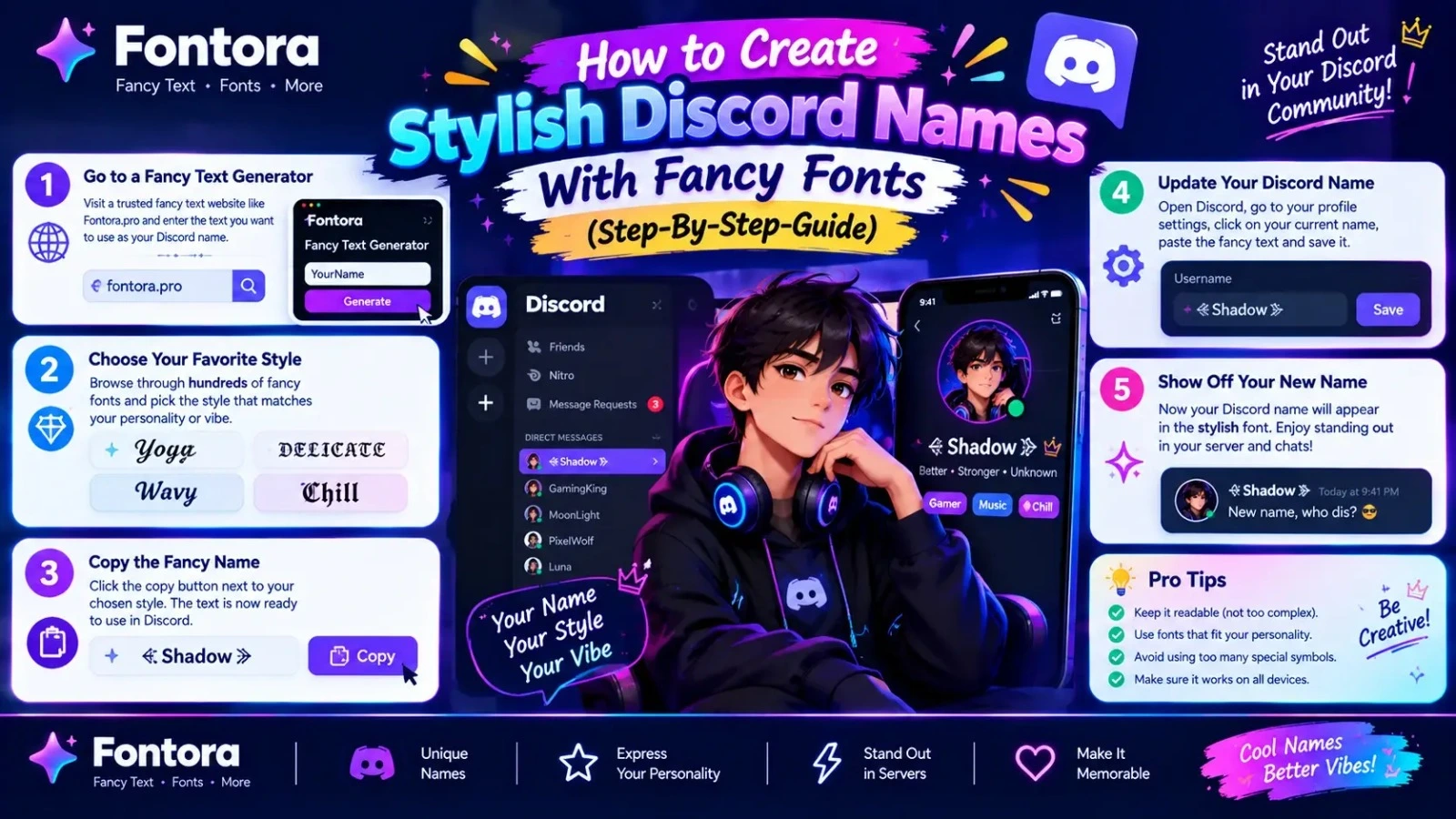
How To Create Stylish Discord Names With Fancy Fonts (Step-by-Step Guide)
Creating a stylish Discord name does not require advanced design skills or any special software. With a Discord Font Generator, users can quickly transform normal text into creative Unicode-based styles and use them directly on their Discord profiles.
Whether you want a unique gaming username, an aesthetic profile name, or a creative server identity, the process is simple. Understanding how Discord Fonts work can help you choose the right style and create better-looking usernames.
Follow these steps to create your own stylish Discord name.
Step 1: Decide Your Discord Name or Text
Before choosing a font style, first decide what text you want to customise.
Your Discord name can include:
Gaming username
Nickname
Clan name
Personal identity
Community name
Short phrase
Example:
Normal Discord name:
Shadow Hunter
This text can now be converted into different Discord font styles.
Step 2: Enter Your Text Into a Discord Font Generator
After selecting your name, enter it into a Discord font generator.
The tool automatically converts your normal text into different Unicode-based styles.
For example:
Original text:
Shadow Hunter
Generated styles:
𝕾𝖍𝖆𝖉𝖔𝖜 𝕳𝖚𝖓𝖙𝖊𝖗
𝐒𝐡𝐚𝐝𝐨𝐰 𝐇𝐮𝐧𝐭𝐞𝐫
𝓢𝓱𝓪𝓭𝓸𝔀 𝓗𝓾𝓷𝓽𝓮𝓻
You can compare different styles and choose the one that matches your profile.
Step 3: Choose The Right Discord Font Style
Selecting the correct style is important because your font should match your personality or community theme.
Gaming Profiles
Best choices:
Bold fonts
Gothic fonts
Glitch fonts
Decorative styles
These styles create a stronger and more competitive appearance.
Personal Profiles
Best choices:
Cursive fonts
Minimal styles
Simple decorative text
These create a cleaner and more personalised look.
Discord Servers
Best choices:
Bold styles
Decorative fonts
Symbol-based designs
These can help organise channels, roles, and community sections.
Step 4: Copy Your Stylish Discord Text
Once you find a style you like, copy the generated text.
The copied text works because it contains Unicode characters rather than a downloadable font file.
You do not need to:
Install fonts
Download applications
Change Discord settings
Use design software
Simply copy the generated text and use it wherever you want.
Step 5: Add The Text To Discord
To use your stylish text on Discord:
Open Discord.
Go to your profile settings.
Edit your username, nickname, or profile information.
Paste your copied fancy text.
Save your changes.
Your Discord profile will now display the selected text style.
Step 6: Check Your Discord Name Appearance
After updating your profile, check how your name appears.
Make sure:
The text is easy to read.
Characters display correctly.
The style matches your profile.
Other users can recognise your name easily.
Some decorative characters may not display correctly on every device, so choosing a compatible style is important.
Pro Tip: Combine Fancy Fonts With Good Username Ideas
A stylish font can improve your Discord name, but the name itself should still be meaningful and memorable.
Weak:
❌ 𝓜𝔂 𝓝𝓪𝓶𝓮 ✨
Better:
✅ 𝕯𝖆𝖗𝖐 𝕲𝖆𝖒𝖊𝖗 ⚔
The best Discord usernames combine:
A unique idea
A suitable font style
Good readability
Personal identity
A well-designed Discord name creates a stronger first impression while keeping your profile easy to recognise.
Cool Discord Name Ideas With Fancy Fonts
A unique Discord name helps you create a memorable online identity. Whether you are a gamer, community member, content creator, or just someone who wants a creative profile, the right combination of words and Discord fonts can make your username more attractive.
Below are different categories of Discord name ideas with stylish text designs. You can copy these ideas or customise them using a Discord font generator.
Gaming Discord Names With Fancy Fonts
Gaming profiles often use powerful, mysterious, or competitive names. Bold and gothic styles usually work well for gaming identities.
Examples:
⚔️ 𝕯𝖆𝖗𝖐 𝕶𝖓𝖎𝖌𝖍𝖙
🔥 𝐅𝐢𝐫𝐞 𝐖𝐚𝐫𝐫𝐢𝐨𝐫
⚡ 𝙂𝙝𝙤𝙨𝙩 𝙎𝙩𝙧𝙞𝙠𝙚𝙧
☠️ 𝕯𝖊𝖆𝖙𝖍 𝕳𝖚𝖓𝖙𝖊𝖗
🎮 𝓟𝓻𝓸 𝓖𝓪𝓶𝓮𝓻
⚔️ 𝙎𝙝𝙖𝙙𝙤𝙬 𝙆𝙞𝙡𝙡𝙚𝙧
🔥 𝔉𝔩𝔞𝔪𝔢 𝔏𝔬𝔯𝔡
Aesthetic Discord Names With Fancy Fonts
Aesthetic names focus on creativity, simplicity, and visual appeal. These styles are popular among users who want a clean and unique profile.
Examples:
✨ 𝓓𝓻𝓮𝓪𝓶𝔂 𝓢𝓸𝓾𝓵
🌙 𝐌𝐨𝐨𝐧 𝐂𝐡𝐢𝐥𝐝
☁️ 𝓢𝓸𝓯𝓽 𝓥𝓲𝓫𝓮𝓼
🌸 𝒜𝓃𝑔𝑒𝓁 𝒮𝑜𝓊𝓁
✨ 𝕊𝕥𝕒𝕣𝕣𝕪 𝔻𝕣𝕖𝕒𝕞
🌙 𝓛𝓸𝓼𝓽 𝓢𝓽𝓪𝓻
Dark Discord Names With Fancy Fonts
Dark and mysterious names are popular in gaming communities and fantasy-based servers.
Examples:
🖤 𝕯𝖆𝖗𝖐 𝕬𝖓𝖌𝖊𝖑
☠️ 𝔖𝔥𝔞𝔡𝔬𝔴 𝔒𝔣 𝔇𝔢𝔞𝔱𝔥
🌑 𝕹𝖎𝖌𝖍𝖙 𝕳𝖚𝖓𝖙𝖊𝖗
⚔️ 𝕭𝖑𝖆𝖈𝖐 𝕽𝖆𝖛𝖊𝖓
🔥 𝕽𝖊𝖉 𝕾𝖕𝖊𝖈𝖙𝖊𝖗
Funny Discord Names With Fancy Fonts
Funny names can make your profile more memorable and create a friendly personality.
Examples:
😂 𝙉𝙤𝙤𝙗 𝙈𝙖𝙨𝙩𝙚𝙧
🤣 𝐒𝐥𝐞𝐞𝐩𝐲 𝐏𝐥𝐚𝐲𝐞𝐫
🍕 𝓟𝓲𝔃𝔃𝓪 𝓛𝓸𝓿𝓮𝓻
😂 𝔅𝔯𝔬𝔨𝔢𝔫 𝔊𝔞𝔪𝔢𝔯
🎮 𝙰𝙵𝙺 𝙻𝙴𝙶𝙴𝙽𝙳
Anime-Inspired Discord Names
Anime communities often use creative and dramatic names inspired by fantasy and character themes.
Examples:
⚔️ 𝓐𝓷𝓲𝓶𝓮 𝓢𝓪𝓶𝓾𝓻𝓪𝓲
🌸 𝓢𝓪𝓴𝓾𝓻𝓪 𝓢𝓸𝓾𝓵
🔥 𝓕𝓲𝓻𝓮 𝓢𝓱𝓲𝓷𝓸𝓫𝓲
⚡ 𝓛𝓸𝓼𝓽 𝓗𝓮𝓻𝓸
🌙 𝓜𝓸𝓸𝓷 𝓢𝓪𝓶𝓾𝓻𝓪𝓲
Discord Server Name Ideas With Fancy Fonts
Server owners can use stylish names to make their communities look more professional and attractive.
Examples:
🌟 ✦ 𝙂𝙖𝙢𝙚𝙧𝙨 𝙃𝙪𝙗 ✦
🎮 ⚡ 𝙀𝙡𝙞𝙩𝙚 𝙂𝙖𝙢𝙞𝙣𝙜 ⚡
🌙 ☾ 𝘿𝙖𝙧𝙠 𝙕𝙤𝙣𝙚 ☽
🔥 ✧ 𝙁𝙞𝙧𝙚 𝘾𝙡𝙖𝙣 ✧
💎 ★ 𝙑𝙞𝙥 𝘾𝙤𝙢𝙢𝙪𝙣𝙞𝙩𝙮 ★
Short Discord Names With Fancy Fonts
Short names are easier to remember and work well for usernames.
Examples:
⚡ 𝕹𝖔𝖛𝖆
🔥 𝕽𝖆𝖌𝖊
🌙 𝕷𝖚𝖓𝖆
⚔️ 𝕬𝖈𝖊
✨ 𝕾𝖙𝖆𝖗
Tips For Choosing A Good Discord Name
When selecting a Discord name, focus on:
Making it easy to remember
Matching your personality or gaming style
Keeping it readable
Avoiding too many symbols
Choosing a font style that fits your theme
A good Discord name should not only look creative but also help people recognise and remember you easily.
Best Discord Symbols To Use With Fancy Fonts
Symbols are an important part of Discord customisation. They can make usernames, server names, roles, and messages more attractive when combined with Discord fonts.
However, symbols should be used carefully. Too many decorative characters can make names difficult to read. The best Discord profiles use symbols to improve appearance while keeping the text clear.
Gaming Discord Symbols
Gaming users often choose symbols that represent power, competition, and adventure.
Popular gaming symbols:
⚔️ Sword
☠️ Skull
🔥 Fire
⚡ Lightning
🎮 Gaming
🏆 Trophy
🛡 Shield
👑 Crown
Examples:
⚔️ 𝕯𝖆𝖗𝖐 𝕶𝖓𝖎𝖌𝖍𝖙
🔥 𝐅𝐢𝐫𝐞 𝐖𝐚𝐫𝐫𝐢𝐨𝐫
👑 𝕮𝖑𝖆𝖓 𝕷𝖊𝖆𝖉𝖊𝖗
These symbols work well for gaming usernames, clan names, and competitive communities.
Decorative Discord Symbols
Decorative symbols can add style and personality to usernames and server designs.
Popular choices:
★ Star
☆ Empty Star
✦ Sparkle
✧ Small Sparkle
✩ Decorative Star
❖ Diamond
◇ Shape
◆ Filled Diamond
Examples:
✦ 𝓢𝓽𝓪𝓻 𝓢𝓸𝓾𝓵 ✦
★ 𝐄𝐥𝐢𝐭𝐞 𝐆𝐚𝐦𝐞𝐫 ★
❖ 𝕯𝖆𝖗𝖐 𝖂𝖔𝖗𝖑𝖉 ❖
These symbols are commonly used for aesthetic profiles and Discord server branding.
Cute Discord Symbols
Users who prefer soft or aesthetic styles often use cute symbols to create a friendly appearance.
Popular cute symbols:
♡ Heart
♥ Filled Heart
ღ Heart Symbol
❀ Flower
🌸 Flower Emoji
☁ Cloud
☾ Moon
Examples:
♡ 𝓒𝓾𝓽𝓮 𝓢𝓸𝓾𝓵
☾ 𝓜𝓸𝓸𝓷 𝓓𝓻𝓮𝓪𝓶𝓮𝓻
🌸 𝓢𝓪𝓴𝓾𝓻𝓪 𝓖𝓲𝓻𝓵
These styles are popular among creative communities and personal profiles.
Minimal Discord Symbols
Some users prefer simple symbols that create a clean and professional look.
Examples:
• Dot
→ Arrow
| Line
~ Wave
Dash
Examples:
→ 𝐃𝐢𝐠𝐢𝐭𝐚𝐥 𝐂𝐫𝐞𝐚𝐭𝐨𝐫
• 𝙲𝚛𝚎𝚊𝚝𝚒𝚟𝚎 𝙶𝚊𝚖𝚎𝚛
Minimal symbols are useful for professional communities and clean profile designs.
Discord Symbols For Server Names
Server owners often use symbols to organise and decorate their communities.
Examples:
🎮 Gaming Hub
✦ Community Lounge
⚔️ Warriors Zone
🌙 Anime World
🔥 Elite Clan
Symbols can make server categories and channels easier to identify.
Tips For Using Discord Symbols
For a better-looking profile:
Choose symbols that match your username style.
Use one or two symbols instead of filling the entire name.
Make sure your username remains readable.
Avoid unusual characters that may not display correctly.
Keep your design simple and memorable.
A stylish Discord name is not only about adding many symbols. The best designs combine:
Creative text + suitable symbols + easy readability
When used correctly, Discord symbols can help create a unique and recognisable online identity.
Tips For Creating Better Discord Names
A good Discord name is not only about using fancy characters and decorative symbols. The best usernames combine creativity, readability, and personality.
A stylish name should help people recognise you easily while showing your identity, gaming style, or community purpose.
Keep Your Discord Name Easy To Read
One of the biggest mistakes users make is adding too many complicated characters that make their names difficult to understand.
For example:
Difficult:
꧁༺𝓓𝓪𝓻𝓴༻꧂⚡☠️🔥𝕶𝖓𝖎𝖌𝖍𝖙
Better:
⚔️ 𝕯𝖆𝖗𝖐 𝕶𝖓𝖎𝖌𝖍𝖙
A simple and clear design usually creates a better impression than an overloaded username.
Choose A Font Style That Matches Your Personality
Different font styles create different feelings.
For example:
Gaming Identity
Use:
Bold fonts
Gothic fonts
Glitch styles
These create a powerful and competitive look.
Example:
𝕯𝖆𝖗𝖐 𝖂𝖆𝖗𝖗𝖎𝖔𝖗
Creative Profile
Use:
Cursive fonts
Decorative styles
Bubble fonts
Example:
𝓒𝓻𝓮𝓪𝓽𝓲𝓿𝓮 𝓢𝓸𝓾𝓵
Professional Community
Use:
Simple bold styles
Minimal designs
Example:
𝐃𝐢𝐠𝐢𝐭𝐚𝐥 𝐂𝐫𝐞𝐚𝐭𝐨𝐫
The font style should support your identity instead of making your name confusing.
Avoid Using Too Many Symbols
Symbols can improve a Discord name, but excessive decoration can reduce readability.
Good:
⭐ 𝓢𝓽𝓪𝓻 𝓖𝓪𝓶𝓮𝓻
Too much:
꧁༺★🔥⚔️𝓢𝓽𝓪𝓻 𝓖𝓪𝓶𝓮𝓻⚔️🔥★༻꧂
A balanced design looks more professional and memorable.
Make Your Discord Name Unique
A unique username helps people remember your profile.
Try combining:
Your interests
Gaming style
Personality
Favourite themes
Examples:
Instead of:
Gamer123
Create:
Shadow Hunter
Cyber Phantom
Nova Warrior
Dark Legend
Then customise it with a suitable Discord font style.
Consider Your Discord Community
Your username should match where you use it.
For example:
Gaming server:
⚔️ 𝕮𝖔𝖒𝖇𝖆𝖙 𝕶𝖓𝖎𝖌𝖍𝖙
Anime community:
🌸 𝓢𝓪𝓴𝓾𝓻𝓪 𝓢𝓸𝓾𝓵
Professional server:
𝐂𝐫𝐞𝐚𝐭𝐢𝐯𝐞 𝐃𝐞𝐬𝐢𝐠𝐧𝐞𝐫
A matching username helps you fit naturally into the community.
Check Compatibility Before Using A Font
Not every Unicode character appears correctly on every device.
Before finalising your Discord name:
Check the appearance on different devices.
Make sure important letters are visible.
Avoid unusual characters that may break.
Choose styles that most users can read.
A good Discord font should look attractive everywhere.
Create A Memorable Online Identity
Your Discord name is part of your online identity. Whether you use Discord for gaming, communities, learning, or networking, your username should represent you.
The best Discord names combine:
A meaningful idea
A suitable font style
Good readability
A consistent theme
Using Discord fonts correctly can help you create a profile that looks unique while remaining easy for others to recognise.
Discord Fonts vs Normal Text: Which One Should You Use?
When creating a Discord profile, username, or server identity, users often wonder whether they should use Discord fonts or keep standard text. Understanding the difference between Unicode-based styles and traditional typography can help you choose the right option. Read our Fancy Text vs Fonts guide to learn how they compare. Both options have their own advantages, and the right choice depends on your purpose.
Fancy text can make your profile more creative and noticeable, while normal text provides better simplicity and readability.
Discord Fonts
Discord fonts are Unicode-based text styles that change the visual appearance of regular letters without requiring font installation.
Example:
Normal text:
Shadow Warrior
Discord font style:
𝕾𝖍𝖆𝖉𝖔𝖜 𝖂𝖆𝖗𝖗𝖎𝖔𝖗
Advantages of Discord fonts:
Make usernames more unique
Add personality to profiles
Help gaming identities stand out
Improve server decoration
Create creative role and channel names
Discord fonts are especially useful for:
Gaming communities
Personal profiles
Creative servers
Online groups
Normal Discord Text
Normal text uses the standard characters available on your keyboard. It is simple, clear, and works everywhere without compatibility concerns.
Example:
Shadow Warrior
Advantages of normal text:
Easy to read
Works on all devices
Simple to search and recognise
Better for professional communication
Normal text is usually better for:
Business communities
Educational servers
Professional usernames
Important announcements
When Should You Use Discord Fonts?
Discord fonts are a good choice when your goal is creativity and customisation.
Use stylish text for:
Gaming usernames
Profile decorations
Server branding
Special roles
Community themes
Example:
Gaming profile:
⚔️ 𝕯𝖆𝖗𝖐 𝕳𝖚𝖓𝖙𝖊𝖗
This creates a stronger visual identity compared to plain text.
When Should You Use Normal Text?
Normal text is better when clarity is the main priority.
Use standard text for:
Important information
Rules channels
Server instructions
Professional communication
Example:
Better:
Server Rules
Instead of:
𝓢𝓮𝓻𝓿𝓮𝓻 𝓡𝓾𝓵𝓮𝓼
For important information, readability is more important than decoration.
The Best Approach: Combine Both Styles
The most effective Discord profiles use a balance between creativity and clarity.
For example:
Server name:
⚡ 𝙂𝙖𝙢𝙚𝙧𝙨 𝙃𝙪𝙗
Channel names:
#general-chat
#gaming-news
#server-rules
This approach keeps the community attractive while making navigation easy.
Final Recommendation
There is no single best choice between Discord fonts and normal text. The right option depends on your goal.
Choose Discord fonts when you want:
A unique username
A creative profile
A stylish gaming identity
Choose normal text when you need:
Maximum readability
Professional communication
Easy recognition
A great Discord profile combines a meaningful name, suitable styling, and clear readability. With the right balance, Discord fonts can help create a memorable online presence without making your profile difficult to use.
Frequently Asked Questions About Discord Fonts
What are Discord fonts?
Discord fonts are stylish text designs created using Unicode characters that change the appearance of normal letters. They allow users to create unique usernames, server names, and messages by copying and pasting different text styles without installing any font files.
How do Discord fonts work?
Discord fonts work by replacing regular characters with special Unicode characters that look like different font styles. A Discord font generator converts your text into these characters, which can then be copied and used on Discord profiles, usernames, and servers.
Are Discord fonts real fonts?
No, most Discord fonts are not actual font files. They are Unicode text characters that visually resemble different fonts. Real fonts require installation and change the way text is displayed in software, while Discord fonts simply use alternative characters that platforms can read.
How can I create a stylish Discord username?
You can create a stylish Discord username by entering your name into a Discord font generator, selecting a preferred style, copying the generated Unicode text, and pasting it into your Discord profile. Popular styles include bold, gothic, cursive, glitch, and decorative text.
Can I use fancy fonts in Discord usernames?
Yes, many Unicode-based fancy text styles can be used in Discord usernames, nicknames, server names, and messages. However, some special characters may not display correctly on every device, so choosing readable styles is recommended.
Are Discord fonts free to use?
Yes, Unicode-based Discord fonts are free to use. Users can generate stylish text online, copy the results, and use them on Discord without downloading additional software or paying for font files.
Why do gamers use Discord fonts?
Gamers use Discord fonts to create unique identities, customise usernames, design clan names, and make their profiles stand out in gaming communities. Different styles help users express their personality and match their gaming theme.
What is the best font style for Discord names?
The best Discord font style depends on your purpose. Bold and gothic styles work well for gaming usernames, cursive styles suit aesthetic profiles, and simple decorative styles are better for professional or community servers.
Can Discord fonts work on mobile devices?
Yes, most Unicode-based Discord fonts work on mobile devices because they are characters supported by modern operating systems. Users can generate text on mobile and paste it directly into the Discord app.
Why is my Discord font not showing correctly?
A Discord font may not display properly if a device does not support certain Unicode characters. Using simpler Unicode styles and avoiding excessive symbols usually improves compatibility across different devices.
Are Discord fonts safe to use?
Yes, Discord fonts created from Unicode characters are generally safe because they are only text characters. Users should still avoid suspicious websites that request unnecessary permissions or downloads when generating fancy text.
What is the difference between Discord fonts and Discord themes?
Discord fonts change the appearance of individual text using Unicode characters, while Discord themes change the overall visual design of the Discord application, such as colors and backgrounds.
How do I make my Discord server look more attractive?
You can improve your Discord server by using organised channel names, matching font styles, clear categories, useful emojis, and consistent branding. Stylish Discord fonts can help decorate server names, roles, and important sections.