 By Hamza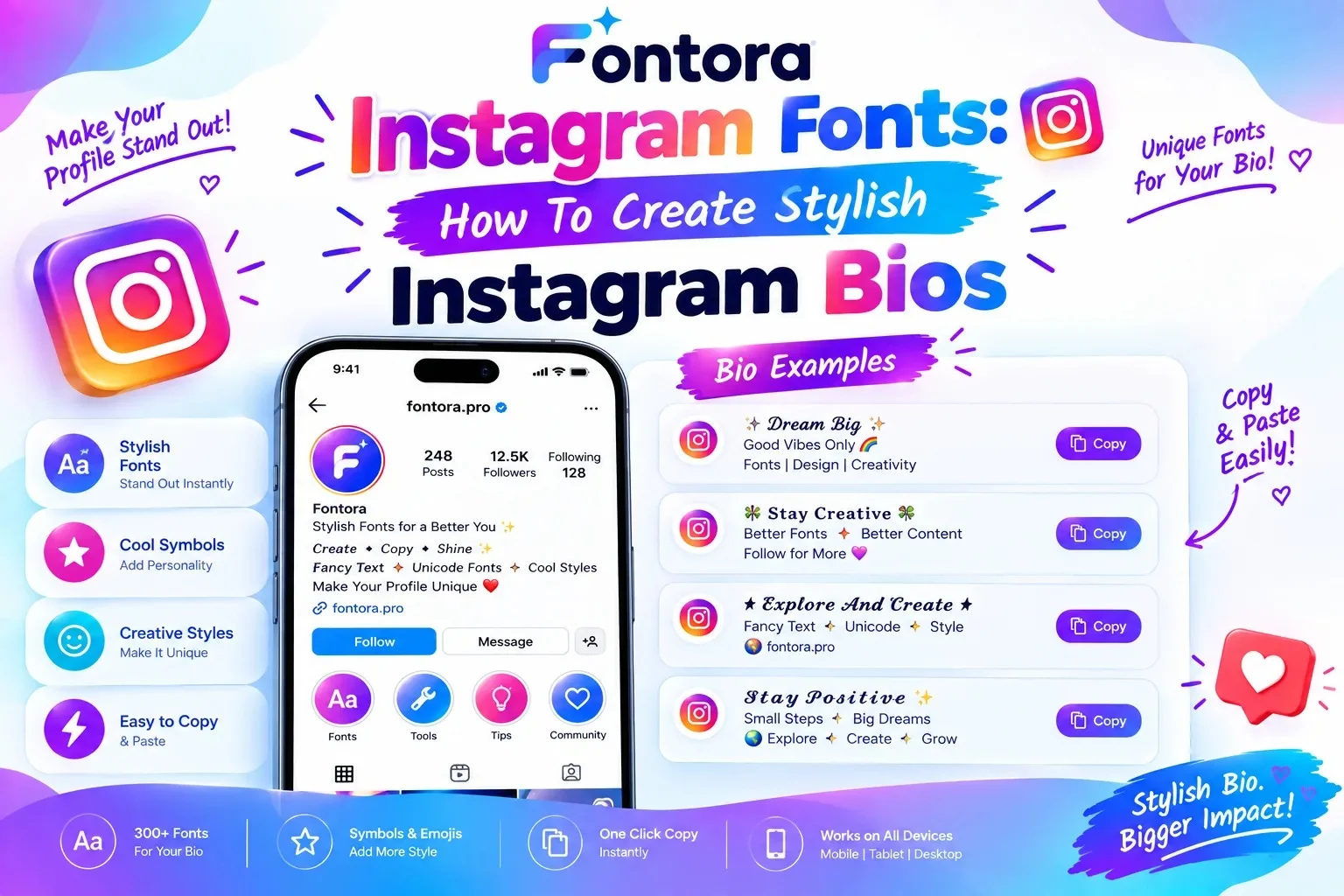
You can get Instagram fonts by using an Instagram font generator, entering your text, selecting a preferred style, copying the generated Unicode text, and pasting it into your Instagram bio, username, or captions. These styles work because Instagram supports many Unicode characters that look like different font designs.
Instagram Fonts: How To Create Stylish Instagram Bios
Introduction
Instagram users are always looking for creative ways to make their profiles more attractive and memorable. Instagram fonts provide an easy way to customize bios, usernames, and captions with unique text styles that help profiles stand out.
These stylish text designs are created using Unicode characters instead of traditional font files, which means users can generate them instantly and copy them directly into Instagram.
Whether you are a creator, business owner, gamer, or casual user, adding the right text style can improve your profile appearance and create a stronger online identity.
In this guide, you will learn how Instagram fonts work, how to create stylish bio text, and how to use different text styles effectively on your profile.
What Are Instagram Fonts?
Instagram fonts are stylish text designs that allow users to customize the appearance of their Instagram profiles, bios, usernames, and captions. They create a unique visual look by changing normal letters into decorative characters that appear similar to different font styles.
Although they are commonly called Instagram fonts, most of these styles are not actual font files. Instead, they are created using Unicode characters that are supported by Instagram and many other digital platforms. Understanding how Unicode characters create different text styles explains why Instagram fonts work without installing traditional fonts.
For example:
Normal text:
Digital Creator
Instagram font style:
𝓓𝓲𝓰𝓲𝓽𝓪𝓵 𝓒𝓻𝓮𝓪𝓽𝓸𝓻
Another style:
𝐃𝐢𝐠𝐢𝐭𝐚𝐥 𝐂𝐫𝐞𝐚𝐭𝐨𝐫
The text looks different visually, but the process does not change the actual Instagram application font. Instead, the characters themselves are replaced with Unicode versions that create a stylish appearance.
Instagram fonts are popular because they help users create a stronger profile identity without needing graphic design software or advanced typography skills.
People commonly use Instagram fonts for:
Instagram bios to highlight their personality or brand message
Usernames to create a memorable profile identity
Captions to make important content stand out
Story text to add creative styling
Business profiles to highlight services or offers
Creators, influencers, businesses, and personal accounts often use these styles to make their profiles more visually appealing. A well-designed bio can help visitors quickly understand who you are and what type of content you share.
However, using Instagram fonts effectively requires balance. Extremely decorative characters may look interesting but can reduce readability or make important information difficult to understand.
The best Instagram font styles combine creativity with clarity. A simple stylish design can improve your profile appearance while keeping your message easy for visitors to read.
Why Do People Use Fancy Fonts on Instagram?
Instagram is a highly visual platform where users compete for attention through photos, videos, and creative profile designs. Fancy fonts help users personalize their profiles and make important text more noticeable compared to standard Instagram text.
People use stylish Instagram fonts for different reasons, including creating a unique identity, improving profile appearance, and making their content easier to recognize. Similar customisation methods are also popular in online communities, where users create unique profiles using Discord fonts.
To Create a Unique Profile Identity
Many Instagram users want their profiles to feel different from others. A creative bio style can help communicate personality, interests, or brand identity within a small space.
For example:
A travel creator may use stylish text to highlight:
Travel | Photography | Adventure
A business profile may use decorative text to highlight:
✨ Handmade Jewelry ✨
The right text style can make a profile feel more professional, creative, or memorable.
To Make Instagram Bios More Attractive
Instagram bios have limited space, so users need to communicate information quickly. Fancy fonts can help organise important details and make certain words stand out.
Users often style:
Names
Job titles
Brand descriptions
Website links
Short quotes
Calls to action
A clean and readable font style can make a bio easier to scan and understand.
To Highlight Important Information
Creators and businesses often use fancy text to draw attention to specific parts of their profile.
Examples include:
New product announcements
Special offers
Content categories
Personal achievements
Brand messages
However, the goal should be highlighting information, not replacing readability with excessive decoration.
To Build Aesthetic Instagram Profiles
Many Instagram users follow specific visual themes. Fancy fonts can support different profile styles, such as:
Minimal aesthetic
Luxury style
Creative portfolios
Gaming profiles
Personal brands
Matching text styles with the overall profile design can create a more consistent appearance.
To Improve Engagement and First Impressions
A profile is often the first interaction someone has with an Instagram account. A well-designed bio can encourage visitors to explore more content or follow the account.
While fancy fonts alone do not guarantee more followers, they can help create a stronger visual impression when combined with valuable content, quality images, and consistent branding.
For Personal and Business Branding
Individuals and businesses use Instagram fonts to create recognizable online identities.
Common users include:
Influencers
Content creators
Small businesses
Online stores
Artists
Freelancers
For businesses, it is important to choose styles that match their brand personality. A professional account usually benefits from clean and simple styles, while creative accounts may use more decorative options.
Fancy fonts are popular on Instagram because they provide an easy way to customize profiles without design software. When used correctly, they can make content more attractive while keeping the message clear and professional.
How To Create Stylish Instagram Bio Fonts (Step-by-Step Guide)
Creating a stylish Instagram bio does not require professional design skills or special software.
With an Instagram Font Generator, you can quickly transform normal text into creative Unicode-based styles and add them directly to your profile. Follow these simple steps to create your own Instagram bio fonts:
Step 1: Decide Your Instagram Bio Text
Before creating a stylish font, decide what message you want to display on your profile.
Your bio can include:
Your name
Profession
Business information
Personal interests
Content category
Call to action
Example:
Normal bio:
Digital Marketing Expert | Helping Businesses Grow
This text can later be converted into different Instagram font styles.
Step 2: Enter Your Text Into an Instagram Font Generator
Open an Instagram font generator and type your desired text into the input box.
The tool converts your regular letters into different Unicode-based styles automatically.
You can generate styles such as:
Bold text
Cursive text
Gothic text
Bubble text
Minimal text
Decorative text
Each style creates a different visual appearance while keeping the same message.
Step 3: Choose a Suitable Instagram Font Style
After generating different options, select a style that matches your profile.
For example:
Personal Profile:
A clean cursive or minimal style may look more attractive.
Business Profile:
Simple bold styles usually create a more professional appearance.
Gaming Profile:
Gothic and decorative styles may better match the theme.
The best choice depends on your audience and the type of content you share.
Step 4: Copy Your Stylish Text
Once you select your preferred design, copy the generated text.
The copied text contains Unicode characters, which means you can use it like normal text on Instagram.
You do not need to:
Download a font
Install an application
Change Instagram settings
Step 5: Add The Text To Your Instagram Bio
To add your stylish text:
Open the Instagram app.
Go to your profile.
Tap Edit Profile.
Select the bio section.
Paste your copied text.
Save your changes.
Your Instagram bio will now display the selected stylish text.
Step 6: Test Your Bio Appearance
After updating your profile, check how it appears on different devices.
Make sure:
The text is readable.
Important information is clear.
Characters display correctly.
The design matches your profile theme.
A stylish Instagram bio should attract attention while still helping visitors understand who you are.
Tips For Creating Better Instagram Bio Fonts
For a professional-looking profile:
Use one or two font styles only.
Avoid filling your bio with too many symbols.
Keep important words easy to read.
Match the style with your personal brand.
Use decorative text for highlights, not every word.
A balanced Instagram bio creates a better user experience and leaves a stronger first impression.
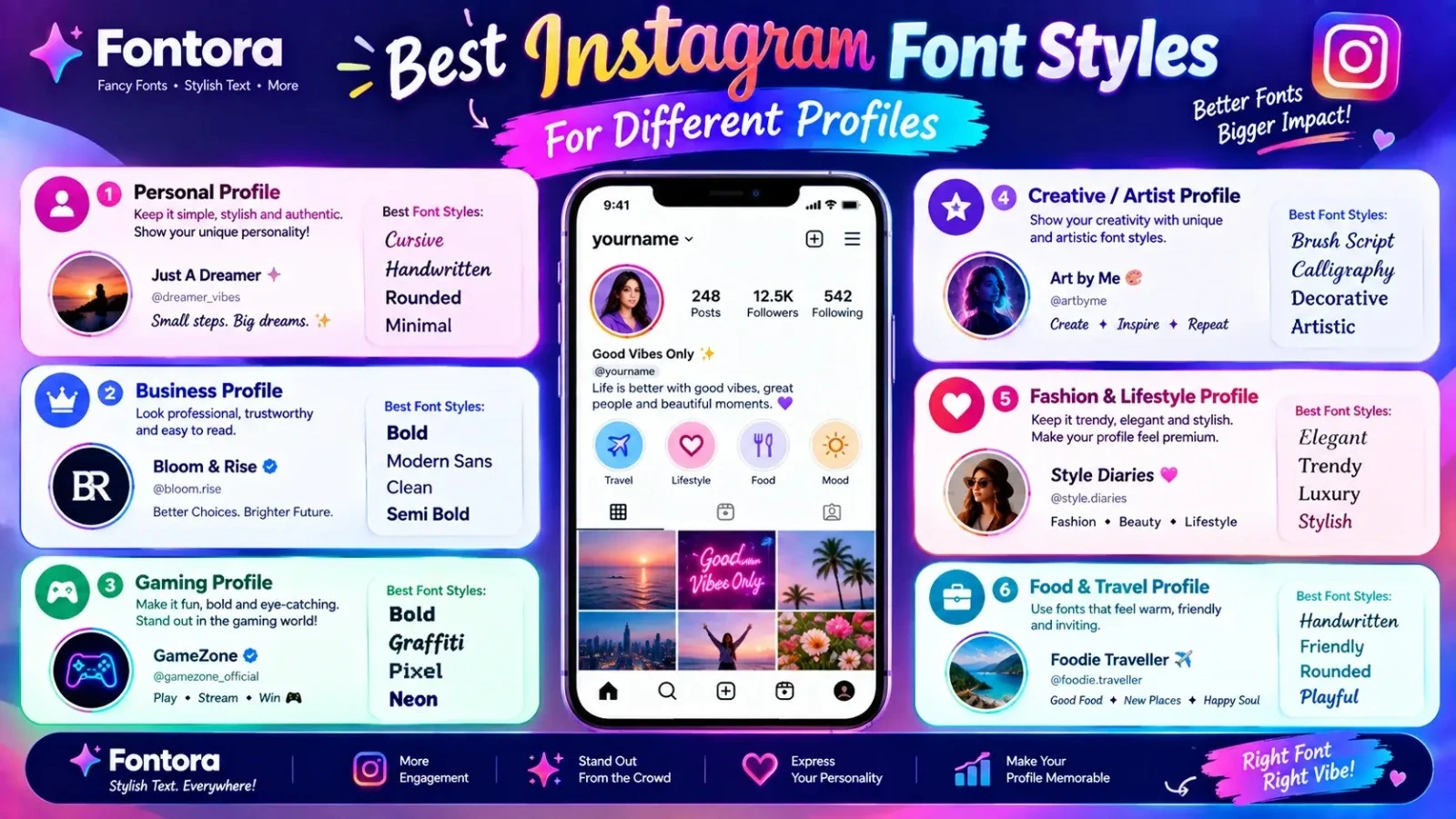
Best Instagram Font Styles For Different Profiles
Choosing the right Instagram font style is important because your text should match your personality, content type, and audience. A stylish font can improve your profile appearance, but the best results come from using designs that are attractive and easy to read.
Different Instagram accounts have different goals, so the ideal font style may vary. Learning about different font styles can help you choose better designs for your Instagram profile and other creative projects.
Cursive Instagram Fonts For Elegant Profiles
Cursive fonts create a smooth and stylish appearance that looks similar to handwritten text. They are commonly used by users who want a creative, elegant, or personal feel.
Cursive Instagram fonts work well for:
Lifestyle creators
Beauty accounts
Photography profiles
Personal brands
Fashion pages
Example:
Normal:
Fashion Designer
Cursive style:
𝓕𝓪𝓼𝓱𝓲𝓸𝓷 𝓓𝓮𝓼𝓲𝓰𝓷𝓮𝓻
This style creates a softer and more artistic impression.
Bold Instagram Fonts For Important Information
Bold styles help important words stand out. They are useful when you want visitors to quickly notice key details in your profile.
Common uses:
Business names
Services
Important announcements
Calls to action
Example:
𝐃𝐢𝐠𝐢𝐭𝐚𝐥 𝐂𝐫𝐞𝐚𝐭𝐨𝐫
Bold Instagram fonts work especially well for business profiles because they improve visibility without making the profile difficult to understand.
Gothic Instagram Fonts For Creative And Gaming Profiles
Gothic fonts have a unique and dramatic appearance. They are popular among users who want a darker, artistic, or gaming-inspired style.
Common users:
Gamers
Music creators
Creative artists
Alternative communities
Example:
𝔊𝔞𝔪𝔦𝔫𝔤 𝔏𝔢𝔤𝔢𝔫𝔡
Gothic styles can create a strong visual identity, but they should be used carefully because some characters may be harder to read.
Bubble Instagram Fonts For Fun Profiles
Bubble fonts create a playful and friendly appearance. They are often used by younger audiences, creators, and accounts focused on entertainment.
Good for:
Personal accounts
Creative pages
Entertainment profiles
Community pages
Bubble styles make text feel more casual and approachable.
Minimal Instagram Fonts For Professional Accounts
Minimal styles are usually the best choice for businesses, freelancers, and professional creators.
They focus on:
Clean appearance
Easy readability
Simple branding
Professional communication
Examples of users who benefit from minimal styles:
Entrepreneurs
Coaches
Agencies
Online stores
A clean Instagram bio often creates more trust because visitors can quickly understand the account purpose.
Decorative Instagram Fonts For Special Occasions
Decorative styles can be useful for temporary content such as:
Event announcements
Giveaways
Celebrations
Special posts
However, using too many decorative characters throughout your profile may reduce readability.
How To Choose The Right Instagram Font Style?
Before selecting a font style, consider:
Your Audience
A gaming audience may prefer bold or gothic styles, while a professional audience may prefer clean and simple designs.
Your Brand Personality
Your font style should match your identity:
Elegant → Cursive
Professional → Minimal
Creative → Decorative
Strong → Bold
Unique → Gothic
Readability
The most attractive font is not always the best choice. If visitors cannot easily understand your bio, the style may negatively affect your profile experience.
The best Instagram font is one that balances creativity, personality, and clarity.
How To Add Fonts To Instagram Bio (Complete Guide)
Adding stylish text to your Instagram bio is a simple process because Instagram supports many Unicode characters. You do not need to change Instagram settings or install any font application. Instead, you can generate your preferred text style, copy it, and paste it directly into your profile. The same method can be used across multiple platforms by following our guide on copy and paste fancy text.
Follow these steps to add Instagram fonts to your bio:
Step 1: Create Your Stylish Instagram Text
First, prepare the text you want to add to your Instagram profile.
Examples:
Your name
Business description
Profession
Short quote
Call to action
Enter your text into an Instagram font generator and select the style that matches your profile.
Example:
Normal:
Digital Creator
Stylish version:
✨ 𝓓𝓲𝓰𝓲𝓽𝓪𝓵 𝓒𝓻𝓮𝓪𝓽𝓸𝓻 ✨
Step 2: Copy The Generated Text
After choosing your preferred Instagram font style:
Select the generated text.
Copy it to your clipboard.
Keep the text ready before opening Instagram.
The copied text contains Unicode characters, which allows it to work like normal text across supported platforms.
Step 3: Open Your Instagram Profile
Now open the Instagram application:
Tap your profile picture.
Open your profile page.
Select Edit Profile.
This section allows you to update your name, bio, and other profile information.
Step 4: Paste The Stylish Text Into Your Bio
Inside the bio section:
Remove existing text if needed.
Paste your copied Instagram font text.
Check how it appears.
Tap save or done.
Your profile will now display the selected stylish text.
Step 5: Check Your Profile Appearance
After saving your changes, view your profile like a visitor.
Check:
Is the text easy to read?
Are all characters displaying correctly?
Does the style match your profile theme?
Is important information still clear?
A good Instagram bio should look attractive while helping visitors understand your profile quickly.
Adding Instagram Fonts To Your Username
Some users also want stylish usernames. However, Instagram has stricter rules for usernames compared to bios.
Before changing your username:
Check if Instagram accepts the characters.
Avoid unusual symbols that may create problems.
Keep your username easy to search.
For most users, adding stylish text to the bio is a better option because it provides more creative freedom.
Best Practices For Instagram Bio Fonts
To create a professional and attractive profile:
Use one main font style.
Keep your bio simple.
Highlight important words only.
Avoid making every word decorative.
Choose readable Unicode characters.
For businesses and creators, a balanced approach works best. A stylish bio can attract attention, but clear information helps visitors understand your brand.
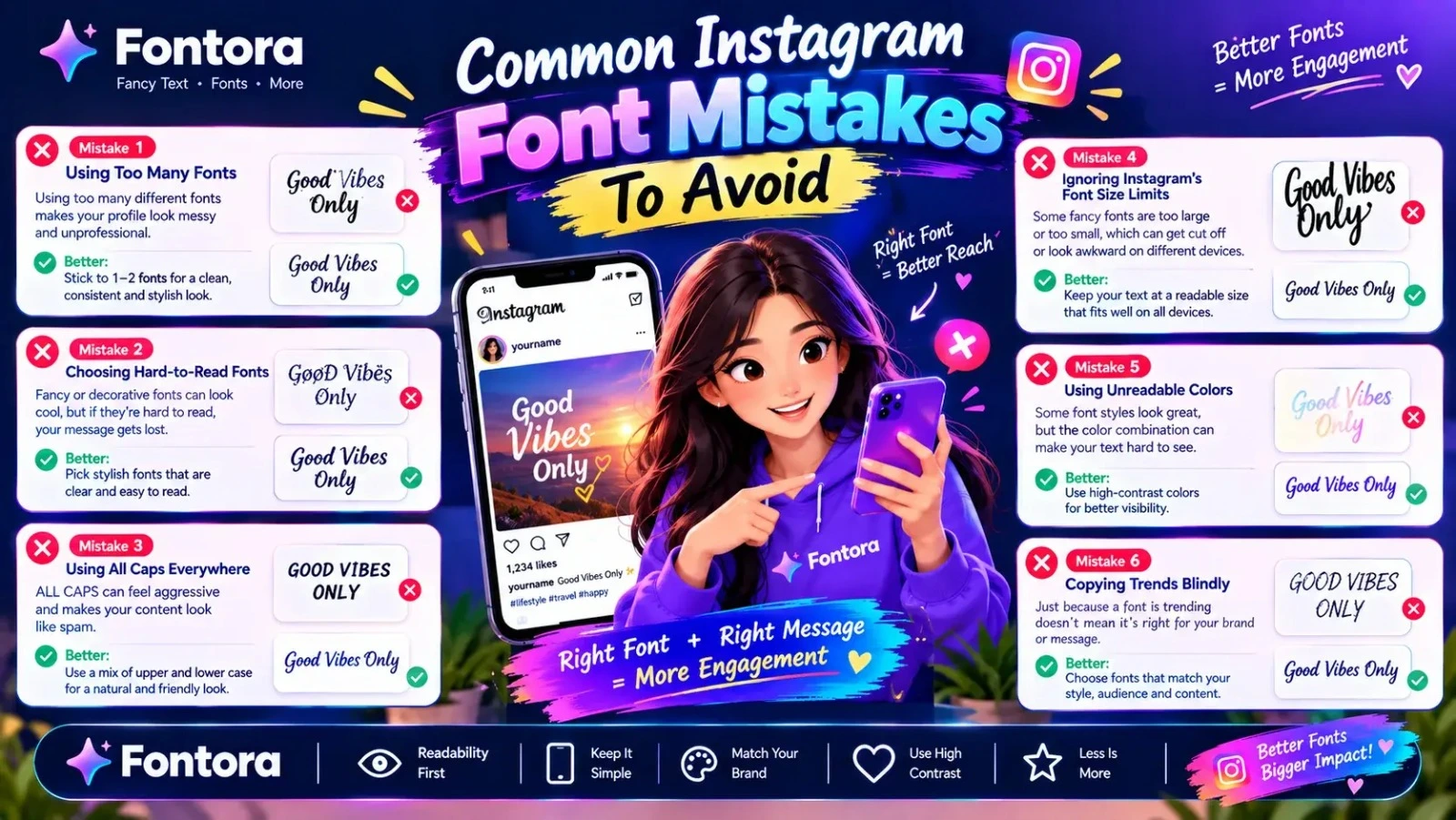
Common Instagram Font Mistakes To Avoid
Using Instagram fonts can make your profile more creative and attractive, but incorrect usage can reduce readability and create a poor user experience. Many users focus only on making their text look unique and forget that clarity is equally important.
Avoiding these common mistakes will help you create a stylish Instagram profile that looks professional and easy to understand.
Using Too Many Font Styles
One of the most common mistakes is mixing multiple fancy text styles in a single Instagram bio.
For example:
❌ Hard to read:
𝓒𝓻𝓮𝓪𝓽𝓸𝓻 | 𝐌𝐚𝐫𝐤𝐞𝐭𝐢𝐧𝐠 | 𝔊𝔯𝔬𝔴𝔱𝔥 | ✨🔥
Using too many styles makes the profile look crowded and reduces readability.
Better approach:
✅ Use one main style and keep the design consistent.
A clean appearance usually creates a stronger impression.
Choosing Fonts That Are Difficult To Read
Some decorative Unicode characters look attractive but can be confusing for visitors.
Avoid styles where:
Letters are unclear
Characters look too similar
Words are difficult to recognize
Important information becomes hidden
Your Instagram bio should communicate your message quickly, especially for new visitors.
Overusing Symbols and Decorations
Symbols can improve a bio when used correctly, but adding too many can make your profile look unprofessional.
For example:
❌ Too many decorations:
꧁༺✨🔥 Welcome To My Page 🔥✨༻꧂
A cleaner version:
✨ Welcome To My Page ✨
The goal is to enhance your message, not distract from it.
Using Fancy Text For Everything
Not every word needs a decorative style. If the entire bio uses complex characters, visitors may find it harder to understand.
Use fancy text for:
Names
Important keywords
Short highlights
Keep detailed information simple.
Ignoring Your Brand Identity
The font style you choose should match your profile purpose.
Examples:
Business account → Clean and professional styles
Fashion profile → Elegant styles
Gaming account → Bold or gothic styles
Personal account → Creative but readable styles
A mismatch between your font style and content can confuse visitors.
Not Testing Characters Before Publishing
Some Unicode characters may appear differently depending on devices and applications.
Before finalizing your Instagram bio:
Check your profile on mobile
Ask someone else to view it
Confirm all characters display correctly
This prevents broken symbols or unreadable text.
Making Your Bio Look Stylish But Forgetting Information
A beautiful bio is useful only when it tells visitors who you are and what you offer.
Always prioritize:
Clear identity
Useful information
Easy navigation
Strong first impression
Design should support your message, not replace it.
Final Tip For Better Instagram Fonts
The best Instagram font style is not the most complicated one. It is the style that creates attention while keeping your profile clear, professional, and easy to understand.
A balanced combination of creativity and readability helps your Instagram profile make a stronger impact.
Conclusion
Instagram fonts are a simple and effective way to make your profile more creative, unique, and memorable. By using Unicode-based characters, users can create stylish bios, usernames, captions, and profile elements without downloading traditional font files or using complicated design tools.
Whether you are a creator, business owner, gamer, or personal user, the right Instagram font style can help you build a stronger online identity and improve the visual appearance of your profile. However, the best results come from balancing creativity with readability by choosing styles that match your audience and purpose.
A well-designed Instagram bio should not only look attractive but also clearly communicate your message. By selecting suitable styles, avoiding excessive decorations, and keeping important information easy to read, you can create a professional and engaging Instagram presence.
Frequently Asked Questions About Instagram Fonts
What are Instagram fonts?
Instagram fonts are stylish text designs created using Unicode characters that change the appearance of regular letters. They allow users to customize Instagram bios, usernames, and captions without installing traditional font files.
Are Instagram fonts real fonts?
No, most Instagram fonts are not actual font files. They are Unicode-based characters that look similar to different font styles. Real fonts are downloadable files used in websites, applications, and professional design projects.
How can I add fancy fonts to my Instagram bio?
You can add fancy fonts to your Instagram bio by using an Instagram font generator, entering your text, selecting a style, copying the generated text, and pasting it into your Instagram profile bio section.
Are Instagram fonts free to use?
Yes, most Instagram font styles are free to generate and use. Since they are usually created with Unicode characters rather than downloadable font files, users can quickly copy and paste them into supported platforms.
Why are my Instagram fonts not working?
Instagram fonts may not work correctly if certain Unicode characters are not supported by your device or Instagram. Some characters may appear differently, as empty boxes, or may not display properly.
Can I use fancy fonts in my Instagram username?
Some fancy text styles may work in Instagram usernames, but Instagram has stricter username rules compared to bios. It is recommended to test the characters before changing your username.
Which Instagram font style is best for a professional profile?
Clean and simple Instagram font styles are usually best for professional profiles. Minimal, bold, or easy-to-read styles help businesses, creators, and personal brands maintain a trustworthy appearance.
Do Instagram fonts work on mobile devices?
Yes, Instagram fonts usually work on modern mobile devices because smartphones support Unicode characters. However, some decorative symbols may appear differently depending on the operating system.
Can businesses use Instagram fonts for branding?
Businesses can use Instagram fonts for small profile elements like bios or highlights, but professional branding usually requires real fonts for logos, websites, and marketing materials.
Are Unicode Instagram fonts safe to use?
Yes, Unicode Instagram fonts are generally safe because they only change the appearance of text and do not install software or access personal information. Users should choose readable styles for better user experience.